
MFC Series Multifunction Printer Quick Setup Guide





31
0
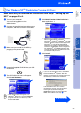
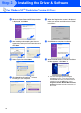
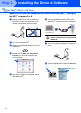
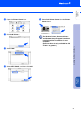
Open the Printer Center icon.
A
Click Add Printer....
B
Select USB.
C
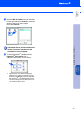
Select MFC-5200C, and then click Add.
D
Select Quit Printer Center from the Printer
Center menu.
The Brother Printer, Scanner drivers
and Remote Setup Program have been
installed and the installation is now
complete.
(Scanner driver is only available for OS
X 10.2.1 or greater.)
Step 2
Installing the Driver & Software
Setting Up
the MFC
Mac
®
OS X
10.1/10.2.1
or greater