
MFC Series Multifunction Printer Quick Setup Guide




30
Installing the Driver & Software
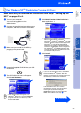
Make sure that you have completed the instructions from Step 1 “Setting Up
the MFC” on pages 2 to 9.
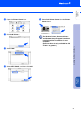
1
Unplug the MFC from the AC outlet and
disconnect it from your Macintosh if you
already connected an interface cable.
2
Turn on your Macintosh
®
.
3
Insert the supplied CD-ROM into your CD-
ROM drive.
4
Double-click the Mac OS X folder to install
the printer driver and Remote Setup
program.
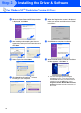
5
Double-click the MFL Pro_Color.pkg icon.
Follow the instructions on the screen.
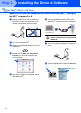
6
Connect the USB interface cable to your
Macintosh
®
, and then connect it to the MFC.
Do not connect the MFC to a USB
port on a keyboard or a non powered
USB hub.
7
Turn on the MFC by pluging in the power
cord.
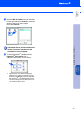
8
Open the Macintosh HD icon.
9
Open the Applications folder.
Open the Utilities folder.
For Mac
®
OS X 10.1, 10.2.1 or greater Users
Step 2