
MFC Series Multifunction Printer Quick Setup Guide





29
9
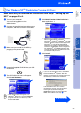
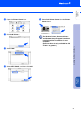
Click the MFL Pro Color icon you installed.
On the right side of the Chooser, select the
printer to which you want to print.
Close the Chooser.
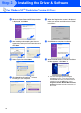
The Brother PC fax, Printer and Scanner
drivers have been installed and the
installation is now complete.
0
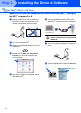
To install PaperPort
®
, double-click the
PaperPort
®
5.5 Installer icon.*1
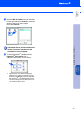
Follow the instructions on the screen.
*1 PaperPort
®
is a document management
application for viewing scanned documents.
ScanSoft
™
TextBridge
®
, which is integrated
into PaperPort
®
, is an OCR application that
converts an image into text and inserts it into
your default word processor.
Installing the Driver & Software
Setting Up
the MFC
Mac
®
OS
8.5-9.2