
MFC Series Multifunction Printer Quick Setup Guide



26
Installing the Driver & Software
8
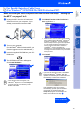
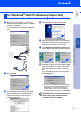
When the PaperPort
®
8.0 SE Setup window
is displayed, click Next.
9
After reading and accepting the License
Agreement, enter your user information and
click Next.
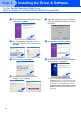
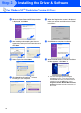
0
Select Typical and click Next.
A
Click Install and PaperPort
®
will start
installing on your computer.
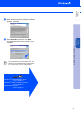
B
When the Registration screen is displayed,
make your section and follow the on screen
instructions.
C
Click Finish to complete installation.
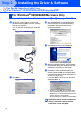
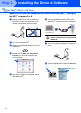
D
When the Brother MFL Pro Suite Installation
window appears, click Next. *2
*2 If an error message appears during the
installation process, or you have previously
installed MFL Pro Suite, you will first have to
uninstall it. From the Start menu, select
Programs, Brother, Brother MFL Pro Suite,
Uninstall, and then follow the instructions on
the screen.
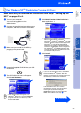
For Windows NT
®
Workstation Version 4.0 Users
Step 2