
Software User's Guide
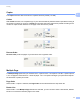
Table Of Contents
- SOFTWARE USER’S GUIDE
- Table of Contents
- Windows®
- 1 Printing
- Using the Brother printer driver
- Features
- Choosing the right type of paper
- Simultaneous printing, scanning and faxing
- Clearing data from the memory
- Status Monitor
- Printer driver settings
- Accessing the printer driver settings
- Basic tab
- Advanced tab
- Print Profiles tab
- Support
- Using FaceFilter Studio for photo printing by REALLUSION
- 2 Scanning
- Scanning a document using the TWAIN driver
- Scanning a document using the WIA driver (Windows® XP/Windows Vista®/Windows® 7)
- Scanning a document using the WIA driver (Windows® Photo Gallery and Windows® Fax and Scan users)
- Using ScanSoft™ PaperPort™12SE with OCR by NUANCE™
- 3 ControlCenter4
- 4 Remote Setup
- 5 Brother PC-FAX Software
- 6 PhotoCapture Center™
- 7 Firewall settings (For Network users)
- 1 Printing
- Apple Macintosh
- 8 Printing and Faxing
- 9 Scanning
- 10 ControlCenter2
- 11 Remote Setup & PhotoCapture Center™
- Using the Scan key
- Index
- brother USA

Printing
11
1
Copies 1
The Copies selection sets the number of copies that will be printed (1 to 999).
Collate 1
With Collate checked, one complete copy of your document will be printed and then reprinted according to
the number of copies you choose. If Collate is unchecked, then each page will be printed according to the
number of copies chosen before the next page of the document is printed.
Reverse Order 1
Reverse Order prints the pages of your document in the opposite order.
Multiple Page 1
The Multiple Page option lets you choose the N in 1 options or the 1 in N options. The N in 1 options print 2,
4, 9 or 16 pages of a document on 1 sheet of paper. The 1 in N options enlarges your print size and prints
the document in poster print mode.
Page Order 1
When the N in 1 option is selected, the Page Order can be selected from the drop-down list.
Border Line 1
When the N in 1 and Multiple Page features are selected, you can choose to have a solid border, dashed
border or no border around each page on the sheet.