
Software User's Guide
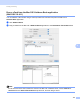
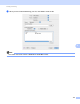
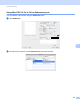
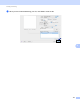

Table Of Contents
- SOFTWARE USER’S GUIDE
- Table of Contents
- Windows®
- 1 Printing
- Using the Brother printer driver
- Features
- Choosing the right type of paper
- Simultaneous printing, scanning and faxing
- Clearing data from the memory
- Status Monitor
- Printer driver settings
- Accessing the printer driver settings
- Basic tab
- Advanced tab
- Print Profiles tab
- Support
- Using FaceFilter Studio for photo printing by REALLUSION
- 2 Scanning
- Scanning a document using the TWAIN driver
- Scanning a document using the WIA driver (Windows® XP/Windows Vista®/Windows® 7)
- Scanning a document using the WIA driver (Windows® Photo Gallery and Windows® Fax and Scan users)
- Using ScanSoft™ PaperPort™12SE with OCR by NUANCE™
- 3 ControlCenter4
- 4 Remote Setup
- 5 Brother PC-FAX Software
- 6 PhotoCapture Center™
- 7 Firewall settings (For Network users)
- 1 Printing
- Apple Macintosh
- 8 Printing and Faxing
- 9 Scanning
- 10 ControlCenter2
- 11 Remote Setup & PhotoCapture Center™
- Using the Scan key
- Index
- brother USA

Scanning
141
9
Scanning a duplex (two-sided) document (For MFC-J6910DW) 9
a Load your document.
b Check Duplex (two-sided) Scanning and choose Long-edge binding or Short-edge binding.
c Adjust the following settings, if needed, in the scanner setup dialog box:
Resolution
Scan Type
Document Size
Adjust Image
• Brightness
• Contrast
d Click Start.
Note
• You cannot adjust the scanning area.
• Duplex scan is available from the ADF only.
• Duplex scan is not available for B4, A3 and Ledger size paper.