
Software User's Guide
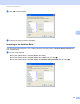
Table Of Contents
- SOFTWARE USER’S GUIDE
- Table of Contents
- Windows®
- 1 Printing
- Using the Brother printer driver
- Features
- Choosing the right type of paper
- Simultaneous printing, scanning and faxing
- Clearing data from the memory
- Status Monitor
- Printer driver settings
- Accessing the printer driver settings
- Basic tab
- Advanced tab
- Print Profiles tab
- Support
- Using FaceFilter Studio for photo printing by REALLUSION
- 2 Scanning
- Scanning a document using the TWAIN driver
- Scanning a document using the WIA driver (Windows® XP/Windows Vista®/Windows® 7)
- Scanning a document using the WIA driver (Windows® Photo Gallery and Windows® Fax and Scan users)
- Using ScanSoft™ PaperPort™12SE with OCR by NUANCE™
- 3 ControlCenter4
- 4 Remote Setup
- 5 Brother PC-FAX Software
- 6 PhotoCapture Center™
- 7 Firewall settings (For Network users)
- 1 Printing
- Apple Macintosh
- 8 Printing and Faxing
- 9 Scanning
- 10 ControlCenter2
- 11 Remote Setup & PhotoCapture Center™
- Using the Scan key
- Index
- brother USA

Brother PC-FAX Software
100
5
f Press a or b to choose <USB> or your PC name if connected on a network.
Press OK.
g Press Backup Print:On or Backup Print:Off.
h Press Stop/Exit.
Note
If you select Backup Print:On, the machine will print the fax, so you will have a copy if there is a power
failure before it is sent to the PC. The fax messages are automatically erased from your machine’s memory
when they have been successfully printed and sent to your PC. When you select Backup Print:Off
your fax messages are automatically erased from your machine’s memory when they have been
successfully sent to your PC.
Running the PC-FAX Receiving software on your PC 5
Click Start, All Programs, Brother, MFC-XXXX, PC-FAX Receiving and Receive.
The PC-Fax Receiving dialog box appears. Confirm the message and click OK.
The PC-FAX icon appears in your PC tasktray.
Setting up your PC 5
a Right-click the PC-FAX icon on your PC tasktray, and then click PC-Fax Rx Setup.
The PC-Fax Rx Setup dialog box appears: