
Network User's Guide


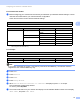




Table Of Contents
- NETWORK USER’S GUIDE
- Definitions of notes
- Compilation and publication notice
- IMPORTANT NOTE
- Table of Contents
- 1 Introduction
- 2 Changing your machine’s network settings
- 3 Configuring your machine for a wireless network
- Overview
- Step by step chart for wireless network configuration
- Confirm your network environment
- Confirm your wireless network setup method
- Configuration using the WPS/AOSS™ control panel menu (Infrastructure mode only) (Recommended)
- Configuration using the machine’s control panel Setup Wizard to configure your wireless network machine
- Configuration using the Brother installer application on the installation CD-ROM to configure your wireless network machine
- Configuration using the PIN Method of Wi-Fi Protected Setup (Infrastructure mode only)
- Configuring your machine for a wireless network (for Infrastructure mode and Ad-hoc mode)
- Using WPS or AOSS™ from the control panel menu to configure your machine for a wireless network
- Using the Setup Wizard from the control panel
- Configuring your machine when the SSID is not broadcast
- Using the Brother automatic installer application on the installation CD-ROM to configure your machine for a wireless network
- Using the PIN Method of Wi-Fi Protected Setup
- 4 Wireless configuration using the Brother installer application
- 5 Control panel setup
- Network menu
- Restoring the network settings to factory default
- Printing the Network Configuration List
- Printing the WLAN Report
- Function table and default factory settings
- 6 Web Based Management
- Overview
- How to configure the machine settings using Web Based Management (web browser)
- Secure Function Lock 2.0
- Changing the Scan to FTP configuration using a web browser
- Changing the Scan to Network configuration using a web browser
- Changing the LDAP configuration using a web browser (MFC-J6910DW only)
- 7 LDAP operation (MFC-J6910DW only)
- 8 Internet fax
- 9 Security features
- 10 Troubleshooting
- Appendix A
- Index

Configuring your machine for a wireless network
18
3
For Touchscreen models 3
a Before configuring your machine we recommend you write down your wireless network settings. You will
need this information before you continue with the configuration.
Check and record the current wireless network settings.
1
TKIP is supported for WPA-PSK only.
Note
If your router uses WEP encryption, enter the key used as the first WEP key. Your Brother machine
supports the use of the first WEP key only.
b Press MENU.
c Press Network.
d Press WLAN.
e Press Setup Wizard.
f When Switch Network interface to wireless? is displayed, press Yes to accept.
This will start the wireless setup wizard.
To cancel, press Stop/Exit.
g The machine will search for your network and display a list of available SSIDs. Press a or b to display
<New SSID>, and press <New SSID>.
SSID (Network Name):
Communication Mode Authentication method Encryption mode Network key
Infrastructure Open system WEP
NONE —
Shared key WEP
WPA/WPA2-PSK AES
TKIP
1
Ad-hoc Open system WEP
NONE —
For example:
SSID (Network Name):
HELLO
Communication Mode Authentication method Encryption mode Network key
Infrastructure WPA2-PSK AES 12345678