
User Manual




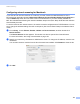
Table Of Contents
- SOFTWARE USER’S GUIDE
- Table of Contents
- Windows®
- 1 Printing
- Using the Brother printer driver
- Features
- Choosing the right type of paper
- Simultaneous printing, scanning and faxing
- Clearing data from the memory
- Status Monitor
- Printer driver settings
- Accessing the printer driver settings
- Basic tab
- Advanced tab
- Print Profiles tab
- Support
- Using FaceFilter Studio for photo printing by REALLUSION
- 2 Scanning
- 3 ControlCenter4
- 4 Remote Setup
- 5 Brother PC-FAX Software
- 6 PhotoCapture Center™
- 7 Firewall settings (For Network users)
- 1 Printing
- Apple Macintosh
- 8 Printing and Faxing
- 9 Scanning
- 10 ControlCenter2
- 11 Remote Setup & PhotoCapture Center™
- Using the Scan key
- Index
- brother CHN-ENG

Network Scanning
191
13
Note
(Windows Vista
®
and Windows
®
7)
If the User Account Control screen appears, do the following:
• For users who have administrator rights: Click Continue or Yes.
• For users who do not have administrator rights: Enter the administrator password and click OK or Yes.
c Click the Network Setting tab and choose the appropriate connection method.
Specify your machine by address
Enter the IP address of the machine in IP Address, and then click Apply or OK.