
User Manual
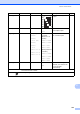


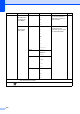


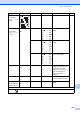


Table Of Contents
- BASIC USER’S GUIDE MFC-J6910DW
- User's Guides and where do I find it?
- Table of Contents
- 1 General information
- 2 Loading paper
- 3 Loading documents
- 4 Sending a fax
- 5 Receiving a fax
- 6 Telephone and external devices
- Voice operations
- Telephone Service for Australia
- Telephone Service for New Zealand
- Telephone Service for Some Countries
- Connecting an external TAD (telephone answering device)
- External and extension telephones
- 7 Dialling and storing numbers
- 8 Making copies
- 9 Printing photos from a memory card or USB Flash memory drive
- 10 How to print from a computer
- 11 How to scan to a computer
- A Routine maintenance
- B Troubleshooting
- C Menu and features
- D Specifications
- Index
- brother ARL/ASA/NZ

Menu and features
131
C
Call History ()
Fax Preview ()
Level1 Level2 Level3 Options Descriptions Page
Call Histo ry Outgoin g Call Send a fax — You can choose a number
from the Outgoing Call
history and then make a
telephone call to it, send a
fax to it, add it to One Touch
Dial, add it to Speed Dial, or
delete it.
53
More Add to One
Touch Dial
Add to Speed
Dial
Delete
Caller ID hist.
Send a fax — You can choose a number
from the Caller ID history
and then send a fax to it,
add it to One Touch Dial,
add it to Speed Dial, or
delete it.
54
More Add to One
Touch Dial
Add to Speed
Dial
Delete
The factory settings are shown in Bold with an asterisk.
Level1 Level2 Level3 Options Descriptions Page
Fax Preview — — On
Off*
You can view faxes you
receive on the LCD screen.
38
The factory settings are shown in Bold with an asterisk.