
User Manual
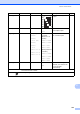


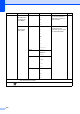


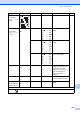


Table Of Contents
- BASIC USER’S GUIDE MFC-J6910DW
- User's Guides and where do I find it?
- Table of Contents
- 1 General information
- 2 Loading paper
- 3 Loading documents
- 4 Sending a fax
- 5 Receiving a fax
- 6 Telephone and external devices
- Voice operations
- Telephone Service for Australia
- Telephone Service for New Zealand
- Telephone Service for Some Countries
- Connecting an external TAD (telephone answering device)
- External and extension telephones
- 7 Dialling and storing numbers
- 8 Making copies
- 9 Printing photos from a memory card or USB Flash memory drive
- 10 How to print from a computer
- 11 How to scan to a computer
- A Routine maintenance
- B Troubleshooting
- C Menu and features
- D Specifications
- Index
- brother ARL/ASA/NZ

130
Phone Book ()
Set New Default
Print Quality
Paper Type
Paper Size
Brightness
Contrast
Color Enhance
Cropping
Borderless
Date Print
— — You can save your print
settings.
See
1
.
Factory R eset ———You can restore all the
settings to factory settings.
Level1 Level2 Level3 Options Descriptions Page
Phone Boo k Send a fax — — You can dial by pressing
only a few keys (and Start).
52
More
Set Speed Dial
— Stores Speed Dial
numbers, so you can dial by
pressing only a few keys
(and Start).
56
Set One Touch
Dial
— You can store your most
frequently called numbers
on the One Touch keys.
55
Setup Groups — Sets up Group numbers for
Broadcasting.
See
1
.
Change — You can change
One Touch Dial and
Speed Dial numbers.
57
Delete — You can delete One Touch
Dial and Speed Dial
numbers.
1
See Advanced User’s Guide.
The factory settings are shown in Bold with an asterisk.
Option1 Option2 Option3 Option4 Descriptions Page
1
See Advanced User’s Guide.
The factory settings are shown in Bold with an asterisk.