
User Manual

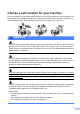

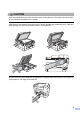

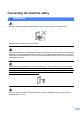


Table Of Contents
- Safety and Legal
- Symbols and conventions used in the documentation
- Compilation and Publication Notice
- Choose a safe location for your machine
- General precautions
- Connecting the machine safely
- Servicing the machine
- Product Warranty & Liability
- Trademarks
- Open Source Licensing Remarks
- Unlawful use of copying equipment
- brother UK/IRE/GEN

6
DO NOT carry the machine by holding the scanner cover or the Jam Clear Cover. Doing this
may cause the machine to slip out of your hands. Only carry the machine by placing your hands
under the entire machine.
(MFC-J6710DW and MFC-J6910DW)
To prevent injuries when moving or lifting this machine, make sure to use at least two people.
Be careful not to pinch your fingers when you set the machine back down.
IMPORTANT
• Disruption of power can wipe out information in the machine's memory.
• (MFC-J6910DW)
DO NOT touch the Touchscreen immediately after plugging in the power cord or turning on the
machine. Doing this may cause an error.
(MFC-J6510DW) 1