
Quick Setup Guide

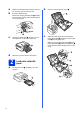


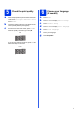


Table Of Contents
- Quick Setup Guide MFC-J280W MFC-J625DW
- Start Here
- 1 Unpack the machine and check the components
- 2 Load plain Letter/A4 paper
- 3 Connect the power cord and telephone line
- 4 Install the ink cartridges
- 5 Check the print quality
- 6 Choose your language (if needed)
- 7 Choose the correct Receive Mode
- 8 Set the LCD contrast (if needed)
- 9 Set the date and time
- 10 Set your Station ID
- 11 Fax Transmission Report
- 12 Set Tone or Pulse dialing mode (Canada only)
- 13 Set the telephone line compatibility (VoIP)
- 14 Automatic Daylight Savings Time
- 15 Send in the Product Registration Sheet (USA only)
- 16 Choose your connection type
- For USB interface users (Windows® XP Home/XP Professional/Windows Vista®/Windows® 7)
- For USB interface users (Mac OS X 10.4.11, 10.5.x, 10.6.x)
- For wireless network interface users
- 17 Before you begin
- 18 Choose your wireless install method
- 19 Configuration using the CD-ROM installer and a USB cable (Windows® only)
- 19 Manual configuration from the control panel (Windows® and Macintosh)
- 19 One-push configuration using WPS or AOSS™ (Windows® and Macintosh)
- Troubleshooting
- Install the drivers & software (Windows® XP Home/XP Professional/Windows Vista®/Windows® 7)
- Install the drivers & software (Mac OS X 10.4.11, 10.5.x, 10.6.x)
- Install Optional Applications Windows®
- For Network Users
- Consumables
- brother USA/CAN
- Start Here

7
5
Check the print quality
a When the preparation process has finished, the
LCD shows Set Paper and Press Start.
Press Start.
b Check the quality of the four color blocks on the
sheet. (black/yellow/cyan/magenta)
c If all lines are clear and visible, press Yes to
finish the quality check and go to step 6.
If you can see missing short lines, press No and
follow the steps on the LCD.
6
Choose your language
(if needed)
a Press Menu.
b Press s or t to display Initial Setup.
c Press Initial Setup.
d Press s or t to display Local Language.
e Press Local Language.
f Press your language.
g Press Stop/Exit.
OK
Poor