
User Manual
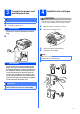
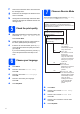
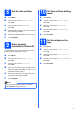
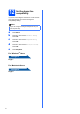
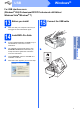
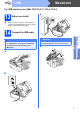
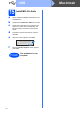
Table Of Contents
- Quick Setup Guide MFC-J220 MFC-J410
- Start Here
- 1 Unpack the machine and check the components
- 2 Load plain A4 paper
- 3 Connect the power cord and telephone line
- 4 Install the ink cartridges
- 5 Check the print quality
- 6 Choose your language
- 7 Choose a Receive Mode
- 8 Set the date and time
- 9 Enter personal information (Station ID)
- 10 Set Tone or Pulse dialling mode
- 11 Set the telephone line type
- 12 Set the phone line compatibility
- For USB interface users (Windows® 2000 Professional/XP/XP Professional x64 Edition/ Windows Vista®/Windows® 7)
- For USB interface users (Mac OS X 10.4.11, 10.5.x, 10.6.x)
- Install Optional Applications Windows®
- brother CEE-ENG
- Start Here

11
Windows
®
Install Optional Applications
1
Install FaceFilter
Studio/BookScan &
Whiteboard Suite
supported by Reallusion,
Inc
a Open the top menu again by ejecting and then
reinserting the installation CD-ROM or by
double-clicking the start.exe program from the
root folder.
b The CD-ROM Top Menu will appear. Choose
your language and then click Additional
Applications.
c Click the button for the application you want to
install.
d Go back to the Additional Applications screen
to install more applications.
2
Install FaceFilter Studio
Help
a To run FaceFilter Studio, go to
start/All Programs/Reallusion/
FaceFilter Studio on your computer.
b Click the button on the upper right
corner of the screen.
c Click Check for updates to go to the
Reallusion update web page.
d Click the Download button and choose a folder
to save the file in.
e Close FaceFilter Studio before you start the
installer for FaceFilter Studio Help.
Double-click the downloaded file from the
folder you specified and follow the on-screen
instructions for installation.
IMPORTANT
• The machine must be ON and connected to
the computer.
• The computer must be connected to the
Internet.
• Make sure you are logged on with
Administrator rights.
• This application is not available for
Windows Server
®
2003/2008 series.
Note
To view the complete FaceFilter Studio Help,
choose start/All Programs/Reallusion/
FaceFilter Studio/FaceFilter Studio Help on
your computer.