
User Manual
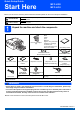
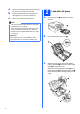
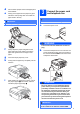
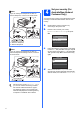
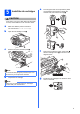
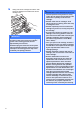
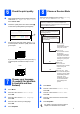

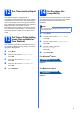
Table Of Contents
- Quick Setup Guide MFC-J220 MFC-J410
- Start Here
- 1 Unpack the machine and check the components
- 2 Load plain A4 paper
- 3 Connect the power cord and telephone line
- 4 Set your country (For Australia/New Zealand Customer Only)
- 5 Install the ink cartridges
- 6 Check the print quality
- 7 Choose your language (if needed) (Not available in Australia and New Zealand)
- 8 Choose a Receive Mode
- 9 Set the LCD contrast (if needed)
- 10 Set the date and time
- 11 Enter personal information (Station ID)
- 12 Fax Transmission Report
- 13 Set Tone or Pulse dialling mode (Not available for New Zealand)
- 14 Set the phone line compatibility
- For USB interface users (Windows® 2000 Professional/XP/XP Professional x64 Edition/Windows Vista®/Windows® 7)
- For USB interface users (Mac OS X 10.4.11, 10.5.x, 10.6.x)
- Install Optional Applications Windows®
- Consumables
- brother ARL/ASA/NZ
- Start Here

3
d Fan the stack of paper well to avoid paper jams
and misfeeds.
e Gently put the paper into the paper tray print
side down and top edge first. Check that the
paper is flat in the tray.
f Gently adjust the paper side guides to the
paper with both hands. Make sure that the
paper side guides touch the edges of the
paper.
g Close the output paper tray cover.
h Slowly push the paper tray completely into the
machine.
i While holding the paper tray in place, pull out
the paper support a until it clicks, and then
unfold the paper support flap b.
3
Connect the power cord
and telephone line
a Connect the power cord.
WARNING
The machine must be fitted with an earthed
plug.
b Connect the telephone line cord. Connect one
end of the telephone line cord to the socket on
the machine marked LINE and the other end to
a telephone wall socket.
WARNING
Since the machine is grounded through the
power outlet, you can protect yourself from
potentially hazardous electrical conditions on
the telephone network by keeping the power
cord connected to your machine when you
connect it to a telephone line. Similarly, you
can protect yourself when you want to move
your machine by disconnecting the telephone
line first and then the power cord.
IMPORTANT
DO NOT push the paper in too far.
1
2
IMPORTANT
DO NOT connect the USB cable yet.
IMPORTANT
The telephone line cord MUST be connected
to the socket on the machine marked LINE.