
User Manual


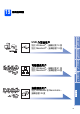


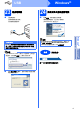

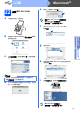

Table Of Contents
- 快速設置指導手冊 MFC-790CW MFC-990CW
- 開始
- 設置無線聽筒 (僅適用於 MFC-990CW )
- 對於 USB 介面用戶 (適用於 Windows® 2000 專業版/XP/XP 專業版 x64 版本/ Windows Vista®)
- 對於 USB 介面用戶 (適用於 Mac OS® X 10.2.4 或更高版本)
- 對於有線網路介面用戶 (適用於 Windows® 2000 專業版/XP/XP 專業版 x64 版本/ Windows Vista®)
- 對於有線網路介面用戶 (適用於 Mac OS® X 10.2.4 或更高版本)
- 對於無線網路介面用戶
- 安裝可選應用程式
- 網路用戶
- 耗材
- brother HK
