
Printer/Fax/Scanner/Copier Quick Setup Guide
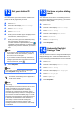
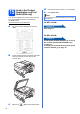
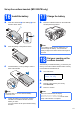
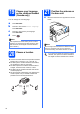
Table Of Contents
- Quick Setup Guide MFC-790CW MFC-990CW
- Start Here
- 1 Unpack the machine and check the components
- 2 Connect the handset (MFC-790CW only)
- 3 Load plain Letter/A4 paper
- 4 Connect the power cord and telephone line
- 5 Install the ink cartridges
- 6 Check the print quality
- 7 Choose your language (If needed)
- 8 Choose the correct Receive Mode
- 9 Setting up the Message Center
- 10 Set the LCD contrast (If needed)
- 11 Set the date and time
- 12 Set your station ID
- 13 Set tone or pulse dialing mode
- 14 Automatic Daylight Savings Time
- 15 Send in the Product Registration and Test Sheet (USA only)
- Set up the cordless handset (MFC-990CW only)
- For USB Interface Users (For Windows® 2000 Professional/XP/XP Professional x64 Edition/ Windows Vista®)
- For USB Interface Users (For Mac OS® X 10.2.4 or greater)
- For Wired Network Interface Users (For Windows® 2000 Professional/XP/XP Professional x64 Edition/ Windows Vista®)
- For Wired Network Interface Users (For Mac OS® X 10.2.4 or greater)
- For Wireless Network Interface Users
- 23 Before you begin
- 24 Confirm your network environment (Infrastructure Mode)
- Connecting the Brother machine to the wireless network
- Install the Drivers & Software (For Windows® 2000 Professional/XP/XP Professional x64 Edition/ Windows Vista®)
- Install the Drivers & Software (For Mac OS® X 10.2.4 or greater)
- Install Optional Applications Windows®
- For Network Users
- Consumables
- brother USA/CAN
- Start Here

13
Set up the cordless handset (MFC-990CW only)
16
Install the battery
a Insert the connector a of the battery b in the
direction shown below.
b Place the battery in the position shown.
c Install the battery cover by sliding it onto the
back of the handset.
d Charge the battery by leaving the cordless
handset in the cradle for at least 12 hours
before you use it.
You can continue to set up the handset during
this time.
17
Charge the battery
a Place the cordless handset on the cradle with
the dial pad facing forward.
18
Set your country on the
cordless handset
The first time you install the battery, you must set your
country so that the cordless handset works correctly
on local telecommunication lines.
a The LCD shows:
Set Country
Press OK Key
b Press Menu/OK.
c Press a or b to choose your country.
Press Menu/OK.
d Press 1 to confirm.
Note
Be careful that you do not catch the battery
connector cord.
1
2
Note
If your battery charge level is getting low, you
should charge the battery. You can see the
battery charge level indicator at the bottom right of
the LCD.
Note
The LCD of the handset will display
“Searching for Base Unit” or
“Base Unit not detected” until the initial
setup of the machine is complete.