
Operation Manual




178
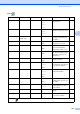
Copy ( )
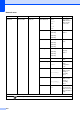
Level1 Level2 Level3 Options Descriptions Page
Quality ——Fast
Normal*
Best
Choose the Copy resolution
for your type of document.
86
Enlarge/ Reduce
100%* ——— 88
Enlarge —
198% 10x15cm
i
A4
186%10x15cm
i
LTR
142% A5 i A4
You can choose the
enlargement ratio for your
type of document.
88
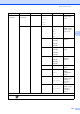
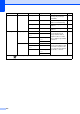
Reduce — 97% LTR i A4
93% A4 i LTR
83% LGL i A4
69% A4 i A5
47% A4
i
10x15cm
You can choose the
reduction ratio for your type
of document.
88
Fit to Page — — Your machine will adjust
the size automatically to the
paper size you set.
88
Custom
(25-400%)
— — You can choose the
enlargement or reduction
ratio for your type of
document.
88
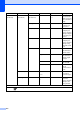
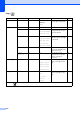
Paper Typ e ——Plain Paper*
Inkjet Pap er
Brother BP 71
Other Glos sy
Transparency
Choose the paper type that
matches the paper in the
tray.
90
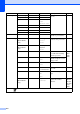
Paper Siz e ——A4*
A5
10x15cm
Letter
Legal
Choose the paper size that
matches the paper in the
tray.
91
The factory settings are shown in Bold with an asterisk.