
User Manual

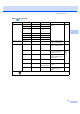
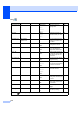
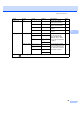
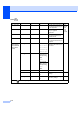

Table Of Contents
- USER’S GUIDE MFC-790CW
- Approval Information and Compilation and Publication Notice
- Table of Contents
- Section I General
- 1 General Information
- 2 Loading paper and documents
- 3 General setup
- 4 Security features
- Section II Fax
- 5 Sending a Fax
- Entering Fax mode
- Broadcasting (Monochrome only)
- Additional sending operations
- Sending faxes using multiple settings
- Contrast
- Changing fax resolution
- Dual access (Monochrome only)
- Real time transmission
- Overseas Mode
- Delayed Faxing (Monochrome only)
- Delayed Batch Transmission (Monochrome only)
- Checking and cancelling waiting jobs
- Setting your changes as a new default
- Restoring all settings to the factory settings
- Sending a fax manually
- Sending a fax at the end of a conversation
- Out of Memory message
- 6 Receiving a Fax
- 7 Telephone and External devices
- 8 Dialling and storing numbers
- 9 Digital TAD
- 10 Printing Reports
- 11 Polling
- 5 Sending a Fax
- Section III Copy
- Section IV Direct Photo Printing
- Section V Software
- Section VI Appendixes
- A Safety and Legal
- B Troubleshooting and Routine Maintenance
- Troubleshooting
- Error and Maintenance messages
- Routine maintenance
- Replacing the ink cartridges
- Cleaning the outside of the machine
- Cleaning the scanner glass
- Cleaning the machine’s printer platen
- Cleaning the paper pick-up roller
- Cleaning the print head
- Checking the print quality
- Checking the print alignment
- Checking the ink volume
- Uninstalling and installing the handset and handset cradle
- Machine Information
- Packing and shipping the machine
- C Menu and Features
- D Specifications
- E Glossary
- Index
- brother CHN-ENG

Menu and Features
171
C
Copy ( )
Level1 Level2 Level3 Options Descriptions Page
Quality ——Fast
Normal*
Best
Choose the Copy resolution
for your type of document.
84
Enlarge/ Reduce
100%* ——— 86
Enlarge —
198% 10x15cm
i
A4
186%10x15cm
i
LTR
142% A5 i A4
You can choose the
enlargement ratio for your
type of document.
86
Reduce — 97% LTR i A4
93% A4 i LTR
83% LGL i A4
69% A4 i A5
47% A4
i
10x15cm
You can choose the
reduction ratio for your type
of document.
86
Fit to Page — — Your machine will adjust
the size automatically to the
paper size you set.
86
Custom
(25-400%)
— — You can choose the
enlargement or reduction
ratio for your type of
document.
86
Paper Type ——Plain Paper*
Inkjet Paper
Brother BP71
Other Glossy
Transparency
Choose the paper type that
matches the paper in the
tray.
88
Paper Size ——A4*
A5
10x15cm
Letter
Legal
Choose the paper size that
matches the paper in the
tray.
89
Brightness ——
Adjusts the brightness of
copies.
88
The factory settings are shown in Bold with an asterisk.
+2
+1
0
-1
Dark
-2
Ligh t