
User Manual
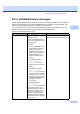
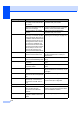
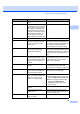
Table Of Contents
- USER’S GUIDE MFC-790CW
- Approval Information and Compilation and Publication Notice
- Table of Contents
- Section I General
- 1 General Information
- 2 Loading paper and documents
- 3 General setup
- 4 Security features
- Section II Fax
- 5 Sending a Fax
- Entering Fax mode
- Broadcasting (Monochrome only)
- Additional sending operations
- Sending faxes using multiple settings
- Contrast
- Changing fax resolution
- Dual access (Monochrome only)
- Real time transmission
- Overseas Mode
- Delayed Faxing (Monochrome only)
- Delayed Batch Transmission (Monochrome only)
- Checking and cancelling waiting jobs
- Setting your changes as a new default
- Restoring all settings to the factory settings
- Sending a fax manually
- Sending a fax at the end of a conversation
- Out of Memory message
- 6 Receiving a Fax
- 7 Telephone and External devices
- 8 Dialling and storing numbers
- 9 Digital TAD
- 10 Printing Reports
- 11 Polling
- 5 Sending a Fax
- Section III Copy
- Section IV Direct Photo Printing
- Section V Software
- Section VI Appendixes
- A Safety and Legal
- B Troubleshooting and Routine Maintenance
- Troubleshooting
- Error and Maintenance messages
- Routine maintenance
- Replacing the ink cartridges
- Cleaning the outside of the machine
- Cleaning the scanner glass
- Cleaning the machine’s printer platen
- Cleaning the paper pick-up roller
- Cleaning the print head
- Checking the print quality
- Checking the print alignment
- Checking the ink volume
- Uninstalling and installing the handset and handset cradle
- Machine Information
- Packing and shipping the machine
- C Menu and Features
- D Specifications
- E Glossary
- Index
- brother CHN-ENG

Troubleshooting and Routine Maintenance
139
B
Image Too Small. The size of your photo is too small
to trim.
Choose a larger image.
Ink low One or more of the ink cartridges
are running out of ink. If a sending
machine has a color fax to send,
your machine’s ‘handshake’ will
ask that the fax be sent as black
and white. If the sending machine
has the ability to convert it, the
color fax will be printed at your
machine as a black and white fax.
Order a new ink cartridge.
Low Temperature The print head is too cold. Allow the machine to warm up.
Media Error The memory card is either
corrupted, incorrectly formatted,
or there is a problem with the
memory card.
Put the card firmly into the slot again to
make sure it is in the correct position. If the
error remains, check the media drive (slot)
of the machine by putting in another
memory card that you know is working.
Media is Full. The memory card or USB flash
memory drive you are using
already contains 999 files.
Your machine can only save to your
memory card or USB flash memory drive if
it contains less than 999 files. Try deleting
unused files to free some space and try
again.
No Caller ID There is no incoming call history.
You did not receive calls or you
have not subscribed to the Caller
ID service from your telephone
company.
If you want to use the Caller ID feature call
your telephone company. (See Caller ID
(Caller IDentification) (not available in
certain area) on page 60.)
No Cartridge An ink cartridge is not installed
correctly.
Take out the new ink cartridge and
re-install it slowly until it clicks. (See
Replacing the ink cartridges on page 147.)
No File The memory card or USB Flash
memory drive in the media drive
does not contain a .JPG file.
Put the correct memory card or USB Flash
memory drive into the slot again.
No Paper Fed The machine is out of paper or
paper is not properly loaded in the
paper tray, or the Jam Clear
Cover is not closed properly.
Do one of the following:
Refill the paper in the paper tray, and
then press Mono Start or Color Start.
Remove the paper and load it again
and then press Mono Start or
Color Start. Close the Jam Clear
Cover properly.
The paper is jammed in the
machine.
See Printer jam or paper jam on page 145.
The Jam Clear Cover is not
closed properly.
Check the Jam Clear Cover is closed
evenly at both ends. (See Printer jam or
paper jam on page 145.)
No Response/Busy The number you dialled does not
answer or is busy.
Verify the number and try again.
Error Message Cause Action