
User Manual
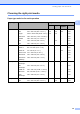
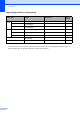
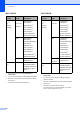

Table Of Contents
- USER’S GUIDE MFC-790CW MFC-990CW
- Approval Information and Compilation and Publication Notice
- Table of Contents
- Section I: General
- 1 General Information
- 2 Loading paper and documents
- 3 General setup
- 4 Security features
- Section II: Fax
- 5 Sending a Fax
- Entering Fax mode
- Broadcasting (Monochrome only)
- Additional sending operations
- Sending faxes using multiple settings
- Contrast
- Changing fax resolution
- Dual access (Monochrome only)
- Real time transmission
- Overseas Mode
- Delayed Faxing (Monochrome only)
- Delayed Batch Transmission (Monochrome only)
- Checking and cancelling waiting jobs
- Setting your changes as a new default
- Restoring all settings to the factory settings
- Sending a fax manually
- Sending a fax at the end of a conversation
- Out of Memory message
- 6 Receiving a Fax
- 7 Telephone and External devices
- Voice operations
- Telephone Service for Australia
- Telephone Service for New Zealand
- Telephone Service for Some Countries
- Connecting an external TAD (telephone answering device)
- External and extension telephones
- 8 Dialling and storing numbers
- 9 Digital TAD
- 10 Printing Reports
- 11 Polling
- 5 Sending a Fax
- Section III: Copy
- Section IV: Direct Photo Printing
- 13 Printing photos from a memory card or USB Flash memory drive
- 14 Printing photos from a camera
- 15 Wireless photo printing (MFC-990CW only)
- Section V: Software
- Section VI: Appendixes
- A Safety and Legal
- B Troubleshooting and Routine Maintenance
- Troubleshooting
- Error and Maintenance messages
- Routine maintenance
- Replacing the ink cartridges
- Cleaning the outside of the machine
- Cleaning the scanner glass
- Cleaning the machine’s printer platen
- Cleaning the paper pick-up roller
- Cleaning the print head
- Checking the print quality
- Checking the print alignment
- Checking the ink volume
- Uninstalling and installing the handset and handset cradle (MFC-790CW only)
- Machine Information
- Packing and shipping the machine
- C Menu and Features
- D Specifications
- E Glossary
- Index
- brother ARL/ASA/NZ

Chapter 3
24
1
You cannot receive a fax with Mono Start or
Colour Start.
2
You can receive telephone calls by lifting the handset
3
When an external TAD is connected and Fax Detect
is turned on.
4
Set before you switch off the machine.
1
You cannot receive a fax with Mono Start or
Colour Start.
2
You cannot receive telephone calls by using the
cordless handset.
3
When an external TAD is connected and Fax Detect
is turned on.
4
Set before you switch off the machine.
5
You cannot receive a fax automatically if you have
set the receive mode to Fax/Tel.
MFC-790CW
On/Off
setting
Receive
mode
Available
operations
Fax Receive:
On
12
(factory
setting)
Fax Only
Fax/Tel
Manual
3
Fax Receive
Fax Detect
Delayed Fax
4
Fax Forward
4
Fax Storage
4
Fax Preview
4
PC Fax Receive
4
Remote Retrieval
4
TAD
Fax Receive
Recording
Incoming Message
Fax Detect
Delayed Fax
4
Fax Forward
4
Fax Storage
4
Fax Preview
4
PC Fax Receive
4
Remote Retrieval
4
Manual Fax Detect
Delayed Fax
4
Fax Receive:
Off
— No machine
operations will be
available other than
cleaning the print
head.
MFC-990CW
On/Off
setting
Receive
mode
Available
operations
Fax Receive:
On
12
(factory
setting)
Fax Only
Manual
3
Fax Receive
Fax Detect
Delayed Fax
4
Fax Forward
4
Fax Storage
4
Fax Preview
4
PC Fax Receive
4
Remote Retrieval
4
TAD
Fax Receive
Recording
Incoming Message
Fax Detect
Delayed Fax
4
Fax Forward
4
Fax Storage
4
Fax Preview
4
PC Fax Receive
4
Remote Retrieval
4
Manual
Fax/Tel
5
Fax Detect
Delayed Fax
4
Fax Receive:
Off
— No machine
operations will be
available other than
cleaning the print
head.