
Printer/Fax/Scanner/Copier OWNER'S MANUAL MFC-9880





58 Chapter 10
Special Copy Options (Using the ADF)
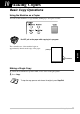
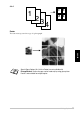
You can save paper by copying either two or four pages onto one page.
1
Insert the document face up in the ADF.
2
Using the dial pad, enter the number of copies you want (up to 99).
3
Press Options and or to select SPECIAL, and then press Set.
4
Press or to select 2 IN 1, 4 IN 1 or OFF, and then press Set.
5
Press Copy—OR—Press or for additional settings.
Special Copy Options (Using the Glass Platen)
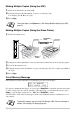
You can save paper by copying either two or four pages onto one page or you can create a poster size
copy of a photograph.
1
Insert the document face down on the glass platen.
2
Using the dial pad, enter the number of copies you want (up to 99).
3
Press Options and or to select SPECIAL, and then press Set.
4
Press or to select 2 IN 1, 4 IN 1, POSTER or OFF, and then press Set.
5
Press Copy.
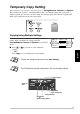
2 in 1
If you selected 2 IN 1 or 4 IN 1 in
Step 4, place the next document on
the glass platen, and then press Set.
After all document have been
scanned, press Copy.
NEXT:PRESS SET
END:PRESS COPY
2
1
1
2