Printer/Fax/Scanner/Copier OWNER'S MANUAL MFC-9880
Manuals
Brands
Brother Manuals
All in One Printer
MFC-9880
161
162
163
164
165
166
167
168
169
170
156
Chapter 20
2
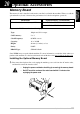
Remove the screws securing the rear cover and remove the cover.
3
Remove the screws securing the access plate and remove the plate.
4
Disconnect the connector of the back up battery.
Back Up
Battery
Back Up Battery
1
...
...
163
164
165
166
167
...
...
182