
Owner`s manual




Table Of Contents
- ZleFB MFC-9880
- APPROVAL INFORMATION
- Using This Manual
- User-Friendly Programming
- Table of Contents
- Preparation and Simple User Guide
- 1 Setup
- 2 Sending a Fax
- 3 Receiving a Fax
- 4 Telephone (Voice) Operation
- 5 Printing Reports
- 6 Advanced Sending
- 7 Advanced Receiving
- 8 Polling
- 9 Remote Fax Options
- 10 Making Copies
- 11 Using the machine as a Printer
- 12 Printer Driver Settings (For Windows® Only)
- Using the Brother MFC-9880 Printer Driver
- Basic Tab
- Advanced Tab
- Accessories Tab
- Support Tab
- General Tab
- Layout Tab
- Paper/Quality Tab
- Advanced Options
- Device Settings Tab
- 13 Using the Windows®-Based Brother Control Centre (For Windows® Only)
- 14 Using ScanSoft™ PaperPort® for Brother and ScanSoft™ TextBridge®
- Viewing Items in ScanSoft™ PaperPort® for Brother
- Organizing Your Items in Folders
- Links to Many Other Applications
- Using ScanSoft™ TextBridge® OCR (Converting Image Text to Text You Can Edit)
- Importing Items from Other Applications
- Exporting Items in Other Formats
- Accessing the Scanner
- Scanning a Document into your PC
- Settings in the Scanner Window
- PreScanning an Image
- 15 Setting Up and Using PC-FAX (For Windows® Only)
- Introduction
- MFC Remote Setup
- PC-FAX Sending (For Windows® Only)
- Setting Up User Information
- Setting Up Sending
- Setting Up Speed Dial
- The Address Book
- Setting Up a Member in the Address Book
- Setting Up a Group for Broadcasting
- Editing Member Information
- Deleting a Member or Group
- Exporting the Address Book
- Importing to the Address Book
- Setting Up Cover Page
- Sending a File as a PC-FAX Using the Simple Style
- Sending a File as a PC-FAX using the Facsimile Style
- PC-FAX Receiving
- 16 Using the Brother MFC with a New Power Macintosh® G3, G4 or iMac™/iBook™
- 17 For DOS User
- 18 Troubleshooting and Maintenance
- 19 Important Safety Information
- 20 Optional Accessories
- 21 Specifications
- Glossary
- Index
APPENDIX
Specifications 163
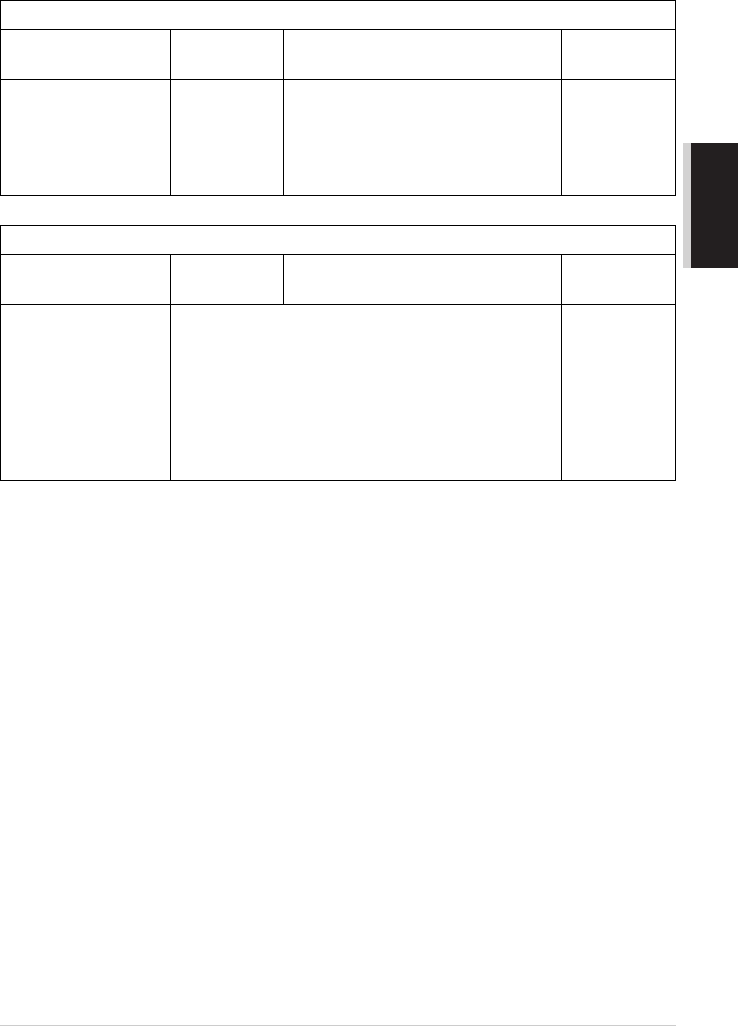
Computer Requirement
Electrical and Environment
Specifications are subject to change for improvement without prior notice.
For Windows
®
Operating System
CPU
(Pentium)
RAM
Hard Disk
Space
95, 98, 98SE 75 MHz 24 MB (32 MB recommended) 50 MB
NT Workstation4.0 75 MHz 32 MB (64 MB recommended)
2000 Professional 133 MHz 64 MB (128 MB recommended)
Me 150 MHz 32 MB (64 MB recommended)
For Macintosh
®
Operating System CPU RAM
Hard Disk
Space
Apple
®
Macintosh
®
QuickDraw
®
G3, G4, iMac or iBook
with OS 8.5/8.5.1
(Only Printer)
OS 8.6/9.0/9.0.4/9.1
(Printer & Scanner)
All base models meet minimum requirements. 50 MB
Temperature (Allowable) 10 - 32.5°C
(Storage) 0 - 40°C
Warm-up Approx. 25 seconds at 23°C
Power source 220 ~ 240V AC 50/60Hz
Power consumption Operating (Copying); 350 W or less (25°C)
Peak: 940 W
Sleep Mode: 15 W or less
Stand by: 75 W or less (25°C)
Noise Operating: 53 dB A or less
Stand by: 39 dB A or less
Humidity Operating: 20 to 80% (without condensation)
Storage: 20 to 80% (without condensation)
Dimensions <W×D×H> 492 × 456 × 429 mm
Weight 17 kg
Memory 8 MB