
Owner`s manual


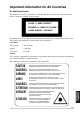


Table Of Contents
- ZleFB MFC-9880
- APPROVAL INFORMATION
- Using This Manual
- User-Friendly Programming
- Table of Contents
- Preparation and Simple User Guide
- 1 Setup
- 2 Sending a Fax
- 3 Receiving a Fax
- 4 Telephone (Voice) Operation
- 5 Printing Reports
- 6 Advanced Sending
- 7 Advanced Receiving
- 8 Polling
- 9 Remote Fax Options
- 10 Making Copies
- 11 Using the machine as a Printer
- 12 Printer Driver Settings (For Windows® Only)
- Using the Brother MFC-9880 Printer Driver
- Basic Tab
- Advanced Tab
- Accessories Tab
- Support Tab
- General Tab
- Layout Tab
- Paper/Quality Tab
- Advanced Options
- Device Settings Tab
- 13 Using the Windows®-Based Brother Control Centre (For Windows® Only)
- 14 Using ScanSoft™ PaperPort® for Brother and ScanSoft™ TextBridge®
- Viewing Items in ScanSoft™ PaperPort® for Brother
- Organizing Your Items in Folders
- Links to Many Other Applications
- Using ScanSoft™ TextBridge® OCR (Converting Image Text to Text You Can Edit)
- Importing Items from Other Applications
- Exporting Items in Other Formats
- Accessing the Scanner
- Scanning a Document into your PC
- Settings in the Scanner Window
- PreScanning an Image
- 15 Setting Up and Using PC-FAX (For Windows® Only)
- Introduction
- MFC Remote Setup
- PC-FAX Sending (For Windows® Only)
- Setting Up User Information
- Setting Up Sending
- Setting Up Speed Dial
- The Address Book
- Setting Up a Member in the Address Book
- Setting Up a Group for Broadcasting
- Editing Member Information
- Deleting a Member or Group
- Exporting the Address Book
- Importing to the Address Book
- Setting Up Cover Page
- Sending a File as a PC-FAX Using the Simple Style
- Sending a File as a PC-FAX using the Facsimile Style
- PC-FAX Receiving
- 16 Using the Brother MFC with a New Power Macintosh® G3, G4 or iMac™/iBook™
- 17 For DOS User
- 18 Troubleshooting and Maintenance
- 19 Important Safety Information
- 20 Optional Accessories
- 21 Specifications
- Glossary
- Index
IMPORTANT
INFORMATION
Important Safety Information 155
Important Information for All Countries
IEC 60825 Specification
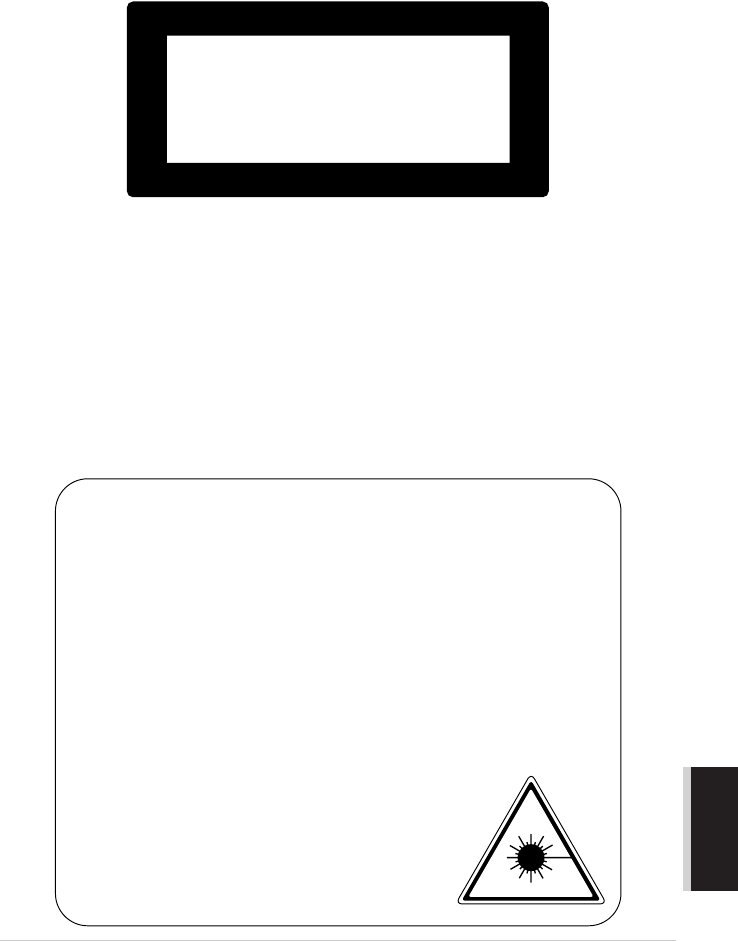
This machine is a Class 1 laser product as defined in IEC 60825 specifications. The label shown
below is attached in countries where required.
This machine has a Class 3B Laser Diode which emits invisible laser radiation in the Scanner Unit.
The Scanner Unit should not be opened under any circumstances.
Laser Diode
Caution
Use of controls, adjustments or performance of procedures other than those specified in this manual
may result in hazardous radiation exposure.
The following caution label is attached near the scanner unit.
Wave length: 760 - 810 nm
Output: 5 mW max.
Laser Class: Class 3B
CLASS 1 LASER PRODUCT
APPAREIL À LASER DE CLASSE 1
LASER KLASSE 1 PRODUKT
CAUTION
ADVARSEL
VARNING
VARO!
ADVARSEL
ATTENTION
VORSICHT
ATENCIÓN
INVISIBLE LASER RADIATION WHEN OPEN AND INTERLOCK OEFEATED.
AVOID DIRECT EXPOSURE TO BEAM. CLASS 3B LASER PRODUCT.
USYNLIG LASER STRÅLING NÅR KABINETLÅGET STÅR ÅBENT.
UNGDÅ DIREKTE UDSÆTTELSE FOR STRÅLING. KLASSE 3B LASER.
OSYNLIG LASERSTRÅLNING NÄR DEN HÄR DELEN ÄR ÖPPNAD OCH SPÄRRAR
ÄR URKOPPLADE. STRÅLEN ÄR FARLIG. KLASS 3B LASER APPARAT.
AVATTAESSA JA SUOJALUKITUS OHITETTAESSA OLET ALTTIINA
NÄKYMÄTTÖMÄLLE LASERSÄTEILYLLE. ÄLÄ KATSO SÄTEESEEN. LUOKAN
3B LASERLAITE.
USYNLIG LASERSTRÅLING, UNNGÅ DIREKTE KONTAKT MED LASERENHETEN
NÅR TOPPDEKSELET ER ÅPENT. KLASSE 3B LASERPRODUKT.
RADIATIONS LASER INVISIBLES OUAND OUVERT ET VERROUILLAGE ENLEVE.
EVITER EXPOSITIONS DIRECTES AU FAISCEAU. PRODUIT LASER CLASSE 3B.
UNSICHTBARE LASERSTRAHLUNG WENN ABDECKUNG
GEÖFFNET UND SICHERHEITSVERRIEGELUNG
ÜBERBRÜCKT. NICHT DEM STRAHL AUSSETZEN.
SICHERHEITSKLASSE 3B.
RADIACIÓN LASER INVISIBLE CUANDO SE ABRE
LA TAPA Y EL INTERRUPTOR INTERNO ESTÁ
ATASCADO. EVITE LA EXPOSICIÓN DIRECTA
DE LOS OJOS. PRODUCTO LASER CLASE 3B.