
MFC-9760 OWNER'S MANUAL



78 Chapter 9
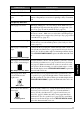
The whole page is printed
black.
Black Page
Clean the machine’s interior and the primary corona wire of the
drum unit. (See Regular Maintenance, page 81 and Cleaning the
Drum Unit, page 83.) Also, do not use heat-sensitive paper as it will
cause this problem. After cleaning, if the printed pages are still
black or the display shows CHANGE DRUM SOON, replace the
drum unit with a new one. The drum unit may be damaged.
Nothing is printed on the
page.
White page
Make sure that the toner cartridge is not empty. If the toner cartridge
is empty, replace the toner cartridge. (See Replacing the Toner
Cartridge, page 84.)
Printed pages are marked
regular intervals.
Example of Regular Marking
Markings may disapu40ogTD(drisap2j.c0ed l -1.235s0-16.n2s 138.299 401.42rD0 Tc0 Twl5vl016.7.ly32aa/0r 48of54le .7290 M 1.2359 e28759 0530n8ixam7Tc4y dis16gry. If p8f p toRof59r48of541.1m69on 247.g, rx .tBT/F27244M8ixam7Tregu9s TmPri41c17.g, rx .tBT/4)TjTp9t4-4175]ogTD(dg0 Ta Tc0 ixai8ixTmPriTc0 ixai8ixTmPriTc0 ixai8ixTmPC1T244Tm6gry4e.gu9s TmPri41c17ddge)t e6u9s Tit 0F11fterr4b74e.v07290 M 1.2359 e2i10 M isa0 M 1e0. d5tagesis l.3vl0160xai 1e0. pon 2 (0c st401.vl0160s0160Rixai8gl.3vl0160 Ta Tps169on ner cartridge ).tgcMb74cMb74cMbd