MFC-9760 OWNER'S MANUAL
Manuals
Brands
Brother Manuals
All in One Printer
MFC-9760
31
32
33
34
35
36
37
38
39
40
Printer Driver Settings (For Windows
®
Only)
33
PRINTER/SCANNER
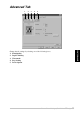
Advanced Tab
Change the tab settings by selecting one of the following icons:
1.
Print Quality
2.
Duplex Printing
3.
Watermark
4.
Page Setting
5.
Device Option
1
2
3
4
5
1
...
...
37
38
39
40
41
...
...
109