
Software User's Guide
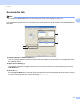

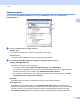
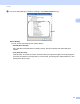
Table Of Contents
- SOFTWARE USER’S GUIDE
- Table of Contents
- Section I: Machine operation keys
- Section II: Windows®
- 2 Printing
- Using the Brother printer driver
- Printing a document
- Duplex printing
- Simultaneous scanning, printing and faxing
- Printer driver settings
- Accessing the printer driver settings
- Features in the Windows® printer driver
- Basic tab
- Advanced tab
- Accessories tab
- Support
- Features in the BR-Script 3 printer driver (PostScript® 3™ language emulation)
- Status Monitor
- 3 Scanning
- Scanning a document using the TWAIN driver
- Scanning a document using the WIA driver (Windows® XP/Windows Vista®/Windows® 7)
- Scanning a document using the WIA driver (Windows Photo Gallery and Windows Fax and Scan)
- Using ScanSoft™ PaperPort™ 12SE with OCR by NUANCE™
- 4 ControlCenter4
- 5 Remote Setup
- 6 Brother PC-FAX Software
- 7 Firewall settings (For Network users)
- 2 Printing
- Section III: Apple Macintosh
- 8 Printing and Faxing
- 9 Scanning
- 10 ControlCenter2
- 11 Remote Setup
- Section IV: Using The Scan key
- 12 Scanning (For USB cable users)
- 13 Network Scanning
- Before using Network Scanning
- Using the Scan key on your network
- Scan to E-mail
- Scan to E-mail (E-mail Server, For MFC-9460CDN, MFC-9560CDW and MFC-9970CDW)
- Scan to Image
- Scan to OCR
- Scan to File
- Scan to FTP
- Scan to Network
- How to set a new default for Scan to E-mail (E-mail Server, For MFC-9970CDW)
- How to set a new default for the file size (For Scan to FTP and Network) (For MFC-9460CDN and MFC-9560CDW)
- Index
- brother USA

Printing
42
2
c You can change settings by choosing a setting in the Printer Features list (3):
Print Quality
You can choose the following print quality settings.
• Normal (600 x 600 dpi)
600 × 600 dpi. Recommended for ordinary printing. Good print quality with reasonable print
speeds.
• Fine (2400 dpi class)
2400 dpi class. The finest print mode. Use this mode to print precise images such as photographs.
Since the print data is much larger than in normal mode, processing time / data transfer time, and
printing time will be longer.