
Network User's Guide for Internet Fax

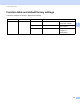
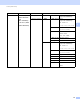
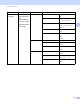
Table Of Contents
- NETWORK USER’S GUIDE
- Definitions of notes
- IMPORTANT NOTE
- Table of Contents
- 1 Internet fax
- 2 Storing numbers and E-mail addresses
- 3 Control panel setup
- E-mail/IFAX menu
- Function table and default factory settings
- Index

Control panel setup
35
3
Main menu Submenu Menu selections Options
7.Network 5.E-mail/IFAX
(MFC-9460CDN
and
MFC-9465CDN)
3.E-mail/IFAX
(MFC-9560CDW)
1.Mail Address —— Name
(Up to 60 characters)
2.Setup Server 1.SMTP
1.SMTP Server
Name
(Up to 64 characters)
IP Address
[000-255].[000-255].[000-255].[000-255]
2.SMTP Port
00025*
[00001-65535]
3.Auth. for SMTP
None*
SMTP-AUTH
POP bef.SMTP
4.SMTP SSL/TLS
None*/SSL/TLS
5.Verify Cert.
On/Off*
2.POP3
1.POP3 Server
Name
(Up to 64 characters)
IP Address
[000-255].[000-255].[000-255].[000-255]
2.POP3 Port
00110*
[00001-65535]
3.Mailbox Name
(Up to 60 characters)
4.Mailbox Pwd
(Up to 32 characters)
5.POP3 SSL/TLS
None*/SSL/TLS
6.Verify Cert.
On/Off*
7.APOP On
Off*