
Network User's Guide for Internet Fax

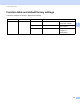
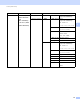
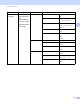
Table Of Contents
- NETWORK USER’S GUIDE
- Definitions of notes
- IMPORTANT NOTE
- Table of Contents
- 1 Internet fax
- 2 Storing numbers and E-mail addresses
- 3 Control panel setup
- E-mail/IFAX menu
- Function table and default factory settings
- Index

Control panel setup
34
3
Function table and default factory settings 3
The factory settings are shown in Bold with an asterisk.
Main menu Submenu Menu selections Options
2.Fax
3.Address Book
1.One Touch Dial
— Stores up to 16 One
Touch Dial numbers.
2.Speed Dial — Stores up to 300 Speed
Dial numbers.
3.Setup Groups — Sets up to 20 Group
numbers for
Broadcasting.