
User`s guide


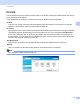

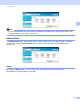

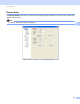

Table Of Contents
- SOFTWARE USER'S GUIDE
- Trademarks
- Table of Contents
- Windows®
- 1 Printing
- Using the Brother printer driver
- Printing a document
- Duplex printing
- Simultaneous scanning, printing and faxing
- Printer operation keys
- Status Monitor
- Printer driver settings
- Features in the Windows® printer driver
- Basic tab
- Advanced tab
- Tray Settings tab
- Support
- Features in the BR-Script (PostScript® 3™ language emulation) printer driver
- 2 Scanning
- Scanning a document using the TWAIN driver
- Scanning a document using the WIA driver (Windows® XP/Windows Vista®/Windows® 7)
- Scanning a document using the WIA driver (Windows Photo Gallery and Windows Fax and Scan)
- Using ScanSoft™ PaperPort™ 11SE with OCR by NUANCE™
- 3 ControlCenter3
- 4 Remote Setup
- 5 Brother PC-FAX Software
- 6 Firewall settings (For Network users)
- 1 Printing
- Apple Macintosh
- 7 Printing and Faxing
- 8 Scanning
- 9 ControlCenter2
- 10 Remote Setup
- Using The Scan key
- Index

ControlCenter3
76
3
PC-FAX 3
The PC-FAX option lets you send and receive faxes. You can also configure the address book and change
some general machine settings.
These buttons are for sending or receiving faxes using the Brother PC-FAX application.
Send
Lets you scan a page or document and automatically send the image as a fax from the PC using the
Brother PC-FAX software. (See PC-FAX sending on page 85.)
Receive
By clicking this button, the PC-FAX receive software is activated and your PC starts receiving fax data from
your Brother machine. After activating the PC-FAX option, the icon name changes to View Received
which when clicked will open an application and display the received faxes. Before using the PC-FAX
Receive option, you must select the PC-FAX Receive option from the control panel menu of the Brother
machine. (See PC-FAX receiving on page 99.)
Address Book
Lets you open the Brother PC-FAX address book. (See Brother Address Book on page 93.)
Setup
Lets you configure the PC-FAX sending settings. (See Sending setup on page 86.)
Note
PC-FAX supports Black & White faxing only.