
User`s guide

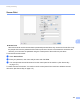
Table Of Contents
- SOFTWARE USER'S GUIDE
- Trademarks
- Table of Contents
- Windows®
- 1 Printing
- Using the Brother printer driver
- Printing a document
- Duplex printing
- Simultaneous scanning, printing and faxing
- Printer operation keys
- Status Monitor
- Printer driver settings
- Features in the Windows® printer driver
- Basic tab
- Advanced tab
- Tray Settings tab
- Support
- Features in the BR-Script (PostScript® 3™ language emulation) printer driver
- 2 Scanning
- Scanning a document using the TWAIN driver
- Scanning a document using the WIA driver (Windows® XP/Windows Vista®/Windows® 7)
- Scanning a document using the WIA driver (Windows Photo Gallery and Windows Fax and Scan)
- Using ScanSoft™ PaperPort™ 11SE with OCR by NUANCE™
- 3 ControlCenter3
- 4 Remote Setup
- 5 Brother PC-FAX Software
- 6 Firewall settings (For Network users)
- 1 Printing
- Apple Macintosh
- 7 Printing and Faxing
- 8 Scanning
- 9 ControlCenter2
- 10 Remote Setup
- Using The Scan key
- Index

Printing and Faxing
129
7
• Improve Toner Fixing
If you choose this setting, the toner fixing on paper may be improved. If this selection does not provide
enough improvement, select Thicker Paper in Media Type settings.
Note
This operation will increase the temperature of the machine's fusing process.
Settings
If you want to change the color settings such as brightness, contrast, intensity or saturation, click the
Settings button to access more advanced settings.
• Brightness (1)
Moving the scroll bar to the right makes your image lighter and moving the scroll bar left makes your
image darker.
• Contrast (2)
Darker sections are darker while lighter sections will be lighter as you increase the contrast.
• Red (3)
Increase the intensity of Red in the image.
• Green (4)
Increase the intensity of Green in the image.
• Blue (5)
Increase the intensity of Blue in the image.
• Saturation (6)
Increase the saturation when you wish to print a more vivid image or decrease the saturation you want
to print a less vivid image.
(1)
(2)
(4)
(3)
(5)
(6)