
User`s guide


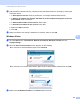
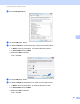
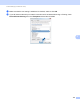



Table Of Contents
- SOFTWARE USER'S GUIDE
- Trademarks
- Table of Contents
- Windows®
- 1 Printing
- Using the Brother printer driver
- Printing a document
- Duplex printing
- Simultaneous scanning, printing and faxing
- Printer operation keys
- Status Monitor
- Printer driver settings
- Features in the Windows® printer driver
- Basic tab
- Advanced tab
- Tray Settings tab
- Support
- Features in the BR-Script (PostScript® 3™ language emulation) printer driver
- 2 Scanning
- Scanning a document using the TWAIN driver
- Scanning a document using the WIA driver (Windows® XP/Windows Vista®/Windows® 7)
- Scanning a document using the WIA driver (Windows Photo Gallery and Windows Fax and Scan)
- Using ScanSoft™ PaperPort™ 11SE with OCR by NUANCE™
- 3 ControlCenter3
- 4 Remote Setup
- 5 Brother PC-FAX Software
- 6 Firewall settings (For Network users)
- 1 Printing
- Apple Macintosh
- 7 Printing and Faxing
- 8 Scanning
- 9 ControlCenter2
- 10 Remote Setup
- Using The Scan key
- Index

104
6
6
Before using the Brother software 6
Firewall settings on your PC may reject the necessary network connection for network printing, network
scanning and PC Fax. If you are using the Windows
®
Firewall and you installed MFL-Pro Suite from the
CD-ROM, the necessary Firewall settings have already been made. If you did not install from the CD-ROM
follow the instructions below to configure your Windows
®
Firewall. If you are using any other personal Firewall
software, see the User’s Guide for your software or contact the software manufacturer.
UDP Port number information for Firewall configuration
1
Add Port number 137 if you still have trouble with your network connection after you added port 54925 and 54926. Port number 137 also supports
printing and Remote Setup over the network.
Windows
®
XP SP2 or greater 6
a Click the Start button, Control Panel, Network and Internet Connections and then
Windows Firewall.
Make sure that Windows Firewall on the General tab is set to On.
b Click the Advanced tab and Settings... button of Network Connection Settings.
c Click the Add button.
Firewall settings (For Network users) 6
UDP Port Network Scanning Network PC-Fax Network Scanning and
Network PC-Fax
1
External Port number 54925 54926 137
Internal Port number 54925 54926 137