
User Manual



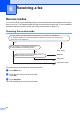

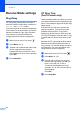
Table Of Contents
- USER’S GUIDE MFC-9125CN MFC-9325CW
- Approval Information and Compilation and Publication Notice
- Table of Contents
- Section I: General
- 1 General information
- Using the documentation
- Accessing the Software User’s Guide and Network User’s Guide
- Viewing documentation
- Viewing documentation (Windows®)
- How to find scanning instructions
- Software User’s Guide:
- ScanSoft™ PaperPort™ 11SE with OCR How-to-Guides:
- How to find Network setup instructions
- Viewing documentation (Macintosh)
- How to find scanning instructions
- Software User’s Guide:
- Presto! PageManager User’s Guide:
- How to find Network setup instructions
- Viewing the Mobile Print/Scan Guide documentation
- Viewing documentation
- Accessing Brother Support (For Windows®)
- Control panel overview
- 2 Loading paper and documents
- 3 General Setup
- 4 Security features
- 1 General information
- Section II: Fax
- 5 Sending a fax
- How to fax
- Broadcasting (black & white only)
- Additional sending operations
- Sending faxes using multiple settings
- Electronic cover page (black & white only)
- Contrast
- Changing Fax Resolution
- Dual access (black & white only)
- Real Time Transmission
- Overseas Mode
- Delayed Fax (black & white only)
- Delayed batch transmission (black & white only)
- Checking and cancelling waiting jobs
- Sending a fax manually
- Out of memory message
- 6 Receiving a fax
- 7 Telephone and external devices
- Telephone line services
- Telephone Service for Australia
- Telephone Service for New Zealand
- Telephone Service for Some Countries
- Connecting an external TAD
- External and extension telephones
- 8 Dialling and storing numbers
- 9 Remote Fax Options (black & white only)
- 10 Polling
- 11 Printing reports
- 5 Sending a fax
- Section III: Copy
- Section IV: Direct printing
- Section V: Software
- Section VI: Appendixes
- A Safety and legal
- B Options
- C Troubleshooting and routine maintenance
- Troubleshooting
- Error and maintenance messages
- Routine maintenance
- Replacing the consumable items
- Replacing periodic maintenance parts
- Machine Information
- Packing and shipping the machine
- D Menu and features
- E Specifications
- F Glossary
- Index

Receiving a fax
47
6
Using receive modes 6
Some receive modes answer faxes
automatically (Fax Only and Fax/Tel).
You may want to change the Ring Delay
before using these modes. (See Ring Delay
on page 48.)
Fax Only 6
Fax Only mode will automatically answer
every call as a fax.
Fax/Tel 6
Fax/Tel mode helps you automatically
manage incoming calls, by recognising
whether they are fax or voice calls and
dealing with them in one of the following
ways:
Faxes will be automatically received.
Voice calls will start the F/T ring to tell you
to pick up the line. The F/T ring is a fast
double ring made by your machine.
Use this mode if you receive few voice calls.
(Also see F/T Ring Time (Fax/Tel mode only)
on page 48 and Ring Delay on page 48.)
Manual 6
Manual mode turns off all automatic
answering functions unless you are using the
Distinctive Ring
1
feature.
1
Fax Ability in New Zealand.
To receive a fax in Manual mode lift the
handset of the external telephone. When you
hear fax tones (short repeating beeps), press
Mono Start, and then press 2 to receive a
fax. You can also use the Fax Detect feature
to receive faxes by lifting a handset on the
same line as the machine.
(Also see Fax Detect on page 49.)
If you use a computer modem on the same
line, Faxing will not operate correctly.
External TAD 6
External TAD mode lets an external
answering device manage your incoming
calls. Incoming calls will be dealt with in the
following ways:
Faxes will be automatically received.
Voice callers can record a message on the
external TAD.
(For more information see Connecting an
external TAD on page 57.)