
User Manual
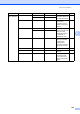
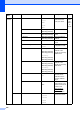
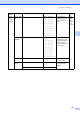
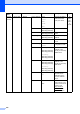
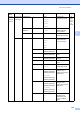
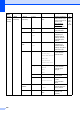
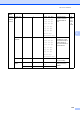
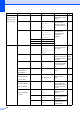


Table Of Contents
- USER’S GUIDE MFC-9125CN MFC-9325CW
- Approval Information and Compilation and Publication Notice
- Table of Contents
- Section I: General
- 1 General information
- Using the documentation
- Accessing the Software User’s Guide and Network User’s Guide
- Viewing documentation
- Viewing documentation (Windows®)
- How to find scanning instructions
- Software User’s Guide:
- ScanSoft™ PaperPort™ 11SE with OCR How-to-Guides:
- How to find Network setup instructions
- Viewing documentation (Macintosh)
- How to find scanning instructions
- Software User’s Guide:
- Presto! PageManager User’s Guide:
- How to find Network setup instructions
- Viewing the Mobile Print/Scan Guide documentation
- Viewing documentation
- Accessing Brother Support (For Windows®)
- Control panel overview
- 2 Loading paper and documents
- 3 General Setup
- 4 Security features
- 1 General information
- Section II: Fax
- 5 Sending a fax
- How to fax
- Broadcasting (black & white only)
- Additional sending operations
- Sending faxes using multiple settings
- Electronic cover page (black & white only)
- Contrast
- Changing Fax Resolution
- Dual access (black & white only)
- Real Time Transmission
- Overseas Mode
- Delayed Fax (black & white only)
- Delayed batch transmission (black & white only)
- Checking and cancelling waiting jobs
- Sending a fax manually
- Out of memory message
- 6 Receiving a fax
- 7 Telephone and external devices
- Telephone line services
- Telephone Service for Australia
- Telephone Service for New Zealand
- Telephone Service for Some Countries
- Connecting an external TAD
- External and extension telephones
- 8 Dialling and storing numbers
- 9 Remote Fax Options (black & white only)
- 10 Polling
- 11 Printing reports
- 5 Sending a fax
- Section III: Copy
- Section IV: Direct printing
- Section V: Software
- Section VI: Appendixes
- A Safety and legal
- B Options
- C Troubleshooting and routine maintenance
- Troubleshooting
- Error and maintenance messages
- Routine maintenance
- Replacing the consumable items
- Replacing periodic maintenance parts
- Machine Information
- Packing and shipping the machine
- D Menu and features
- E Specifications
- F Glossary
- Index

214
7.Network
(MFC-9325CW)
(Continued)
2.WLAN
(Continued)
1.TCP/IP
(Continued)
0.IPv6 On
Off*
Enable or Disable the
IPv6 protocol. If you
want to use the IPv6
protocol, visit
http://solutions.
brother.com/ for
more information.
See
Network
User
’
s
Guide on
the
CD
-
ROM.
2.Setup Wizard
1.On
2.Off
— You can configure
your print server.
3.SES/WPS/AOSS
1.On
2.Off
— You can easily
configure your
wireless network
settings using the
one-button push
method.
4.WPS w/PIN
Code
1.On
2.Off
— You can easily
configure your
wireless network
settings using WPS
with a PIN code.
5.WLAN Status
1.Status Active(11b)
Active(11g)
Wired LAN Active
WLAN OFF
AOSS Active
Connection Fail
You can see the
current wireless
network status.
2.Signal Strong
Medium
Weak
None
You can see the
current wireless
network signal
strength.
3.SSID — You can see the
current SSID.
4.Comm. Mode Ad-hoc
Infrastructure
You can see the
current
Communication
Mode.
6.Set to
Default
— 1.Reset
2.Exit
Restore the wireless
network settings to
factory default.
7.WLAN Enable
— On
Off*
Enable or disable the
wireless LAN
manually.
Main
Menu
Submenu Menu Selections Options Descriptions Page