
User Manual

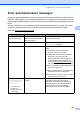

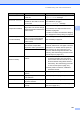
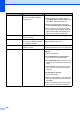
Table Of Contents
- USER’S GUIDE MFC-9125CN MFC-9325CW
- Approval Information and Compilation and Publication Notice
- Table of Contents
- Section I: General
- 1 General information
- Using the documentation
- Accessing the Software User’s Guide and Network User’s Guide
- Viewing documentation
- Viewing documentation (Windows®)
- How to find scanning instructions
- Software User’s Guide:
- ScanSoft™ PaperPort™ 11SE with OCR How-to-Guides:
- How to find Network setup instructions
- Viewing documentation (Macintosh)
- How to find scanning instructions
- Software User’s Guide:
- Presto! PageManager User’s Guide:
- How to find Network setup instructions
- Viewing the Mobile Print/Scan Guide documentation
- Viewing documentation
- Accessing Brother Support (For Windows®)
- Control panel overview
- 2 Loading paper and documents
- 3 General Setup
- 4 Security features
- 1 General information
- Section II: Fax
- 5 Sending a fax
- How to fax
- Broadcasting (black & white only)
- Additional sending operations
- Sending faxes using multiple settings
- Electronic cover page (black & white only)
- Contrast
- Changing Fax Resolution
- Dual access (black & white only)
- Real Time Transmission
- Overseas Mode
- Delayed Fax (black & white only)
- Delayed batch transmission (black & white only)
- Checking and cancelling waiting jobs
- Sending a fax manually
- Out of memory message
- 6 Receiving a fax
- 7 Telephone and external devices
- Telephone line services
- Telephone Service for Australia
- Telephone Service for New Zealand
- Telephone Service for Some Countries
- Connecting an external TAD
- External and extension telephones
- 8 Dialling and storing numbers
- 9 Remote Fax Options (black & white only)
- 10 Polling
- 11 Printing reports
- 5 Sending a fax
- Section III: Copy
- Section IV: Direct printing
- Section V: Software
- Section VI: Appendixes
- A Safety and legal
- B Options
- C Troubleshooting and routine maintenance
- Troubleshooting
- Error and maintenance messages
- Routine maintenance
- Replacing the consumable items
- Replacing periodic maintenance parts
- Machine Information
- Packing and shipping the machine
- D Menu and features
- E Specifications
- F Glossary
- Index

Troubleshooting and routine maintenance
147
C
Drums End Soon The drum units are near the end
of their life.
Buy new drum units before you get a
Replace Drums message.
Drum End Soon(X)
1
The drum unit for the colour
indicated on the LCD is near the
end of its life.
Buy new drum unit for the colour indicated on
the LCD before you get a
Replace Drum(X)
1
message.
DR mode in Use
(except New Zealand)
The machine is set to Distinctive
Ring mode. You can not change
the Receive Mode from Manual to
another mode.
Set Distinctive Ring to off.
For Austlaria, see Telephone Service for
Australia on page 52.
For Other countries, see Distinctive Ringing
(For Singapore and Hong Kong) on page 55.
Faxability On
(For New Zealand)
The machine is set to Faxability
mode. You can not change the
Recieve Mode from Manual to
another mode.
Set Faxability to off.
See FaxAbility on page 54.
Fuser Error The temperature of fuser unit
does not rise at a specified
temperature within specified time.
Turn the power switch off, wait a few
seconds, and then turn it on again. Leave the
machine for 15 minutes with the power on.
The machine can be turned off for up to
60 hours without losing faxes stored in the
memory. (See Transferring your faxes or Fax
Journal report on page 151.)
The fuser unit is too hot.
Init Unable XX
(XX=Error Code)
The machine has a mechanical
problem.
Disconnect the machine from the power
for several minutes, then reconnect it.
(The machine can be turned off for up to
60 hours without losing faxes stored in
the memory. See Transferring your faxes
or Fax Journal report on page 151.)
If the problem continues, call Brother
Customer Service.
Jam Inside The paper is jammed inside the
machine.
(See Paper jams on page 153.)
Jam Rear The paper is jammed in the back
of the machine.
(See Paper jams on page 153.)
Jam Tray The paper is jammed in the paper
tray of the machine.
(See Paper jams on page 153.)
No Belt Unit The belt unit is not installed
correctly.
Re-install the belt unit. (See Replacing the
belt unit on page 181.)
Error Message Cause Action