
User's Manual




204
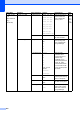
5.
USB Direct
I/F
(MFC-9320CW
only)
(Continued)
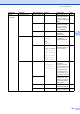
2.Scan to USB 1.Resolution Color 100 dpi*
Color 200 dpi
Color 300 dpi
Color 600 dpi
Gray 100 dpi
Gray 200 dpi
Gray 300 dpi
B&W 200 dpi
B&W 200x100 dpi
Sets the resolution to
send the scanned
data to USB Flash
memory drive.
See
Software
User
’
s
Guide on
the
CD
-
ROM.
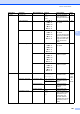
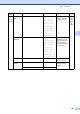
2.File Name — Enter the file name of
the scanned data.
3.PictBridge 1.Paper Size Letter
A4*
B5
A5
B6
A6
Sets the paper size
when printing data
from a camera with
using PictBridge.
94
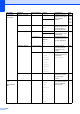
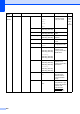
2.Orientation Letter
A4
B5
A5
B6
A6
Then, you will
choose
Portrait
Landscape
Sets the page
orientation when
printing data from a
camera using
PictBridge, If you
choose the paper size
Letter, A4, or B5,
Portrait will be chosen.
If you choose A5, B6
or A6, Landscape will
be chosen.
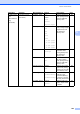
3.Date & Time On
Off*
Prints the date and
time the photo is being
taken on the photo.
4.File Name On
Off*
Prints the file name of
the data on the photo.
5.Print Quality
Normal*
Fine
Sets the print quality
option when printing
data from a camera
using PictBridge.
Main Menu Submenu Menu Selections Options Descriptions Page