
User Manual


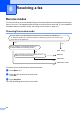

Table Of Contents
- USER’S GUIDE MFC-9120CN MFC-9320CW
- Approval Information and Compilation and Publication Notice
- Table of Contents
- Section I: General
- Section II: Fax
- Sending a fax
- How to fax
- Broadcasting (black & white only)
- Additional sending operations
- Sending faxes using multiple settings
- Electronic cover page (black & white only)
- Contrast
- Changing Fax Resolution
- Dual access (black & white only)
- Real Time Transmission
- Overseas Mode
- Delayed Fax (black & white only)
- Delayed batch transmission (black & white only)
- Checking and cancelling waiting jobs
- Sending a fax manually
- Out of memory message
- Receiving a fax
- Telephone and external devices
- Dialling and storing numbers
- Remote Fax Options (black & white only)
- Polling
- Printing reports
- Sending a fax
- Section III: Copy
- Section IV: Direct printing
- Section V: Software
- Section VI: Appendixes
- Index
- brother CHN_ENG

44
6
Receive modes 6
You must choose a receive mode depending on the external devices and telephone services you
have on your line. The diagrams below will help you choose the correct mode. (For more detailed
information about the receive modes, see Using receive modes on page 45.)
Choosing the receive mode 6
To set the receive mode follow the instructions below.
a Press Menu, 0, 1.
b Press a or b to choose the receive mode.
Press OK.
c Press Stop/Exit.
The LCD will display the current receive mode.
Receiving a fax 6
Do you want to use the telephone features of your machine (if available) or
an external telephone or external telephone answering device connected on the
same line as the machine?
Yes
Fax Only
No
No
No
Manual
Yes
External TAD
Fax/Tel
Are you using the voice message function of
an external telephone answering device?
Do you want the machine to answer fax and
telephone calls automatically?
Yes