
User Manual


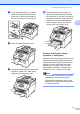

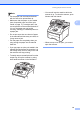
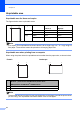



Table Of Contents
- USER’S GUIDE MFC-9120CN MFC-9320CW
- Approval Information and Compilation and Publication Notice
- Table of Contents
- Section I: General
- Section II: Fax
- Sending a fax
- How to fax
- Broadcasting (black & white only)
- Additional sending operations
- Sending faxes using multiple settings
- Electronic cover page (black & white only)
- Contrast
- Changing Fax Resolution
- Dual access (black & white only)
- Real Time Transmission
- Overseas Mode
- Delayed Fax (black & white only)
- Delayed batch transmission (black & white only)
- Checking and cancelling waiting jobs
- Sending a fax manually
- Out of memory message
- Receiving a fax
- Telephone and external devices
- Dialling and storing numbers
- Remote Fax Options (black & white only)
- Polling
- Printing reports
- Sending a fax
- Section III: Copy
- Section IV: Direct printing
- Section V: Software
- Section VI: Appendixes
- Index
- brother CHN_ENG

Chapter 2
14
a Open the back cover (back output tray).
b <For printing envelopes only>
Pull down the two grey levers, one on
the left-hand side and one on the
right-hand side, toward you as shown in
the illustration below.
c Open the manual feed slot cover.
d Using both hands, slide the manual feed
slot paper guides to the width of the
paper that you are going to use.
e Using both hands, put one sheet of
paper or one envelope in the manual
feed slot until the front edge of the paper
or envelope touches the paper feed
roller. When you feel the machine pull in
the paper, let go.