
User Manual
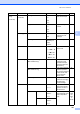
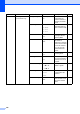
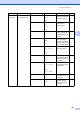

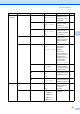


Table Of Contents
- USER’S GUIDE MFC-9120CN MFC-9320CW
- Approval Information and Compilation and Publication Notice
- Table of Contents
- Section I: General
- Section II: Fax
- Sending a fax
- How to fax
- Broadcasting (black & white only)
- Additional sending operations
- Sending faxes using multiple settings
- Electronic cover page (black & white only)
- Contrast
- Changing Fax Resolution
- Dual access (black & white only)
- Real Time Transmission
- Overseas Mode
- Delayed Fax (black & white only)
- Delayed batch transmission (black & white only)
- Checking and cancelling waiting jobs
- Sending a fax manually
- Out of memory message
- Receiving a fax
- Telephone and external devices
- Dialling and storing numbers
- Remote Fax Options (black & white only)
- Polling
- Printing reports
- Sending a fax
- Section III: Copy
- Section IV: Direct printing
- Section V: Software
- Section VI: Appendixes
- Index
- brother CHN_ENG

Menu and features
197
D
4.Printer
(continued)
4.Reset Printer — 1.Reset Restores the printer
settings to the original
factory default
settings.
See
Software
User
’
s
Guide on
the
CD
-
ROM.
2.Exit
5.Calibration — Calibrate
Reset
Adjusts the color
density or returns the
color calibration to the
factory settings.
159
6.Auto Regist. 1.Registration 1.Start Adjust the print
position of each color
automatically.
160
2.Exit
2.Frequency Low
Medium*
High
Off
Set the interval time
you want to carry out
the auto registration.
7.Manual Regist. 1.Print Chart — Print the chart to
manually check the
registration of the
colors.
160
2.Set Regist. 1 Magenta
2 Cyan
3 Yellow
4 Magenta
5 Cyan
6 Yellow
7 Magenta
8 Cyan
9 Yellow
Sets the correction
value on the chart you
printed from
Print Chart.
8.Drum Cleaning — — Carry out cleaning the
drum unit to improve
the print quality
problem.
154
5.USB Direct
I/F
(MFC
-
9320CW
only)
1.Direct Print 1.Paper Size A4*
Letter
Legal
Executive
A5
A5 L
A6
B5
B6
Folio
16K(195x270mm)
16K(184x260mm)
16K(197x273mm)
Sets the paper size
when printing directly
from the USB flash
memory drive.
95
Main Menu Submenu Menu Selections Options Descriptions Page