
User Manual
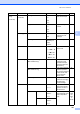
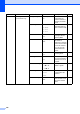
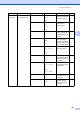

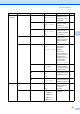
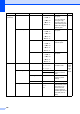

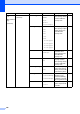

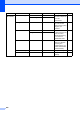
Table Of Contents
- USER’S GUIDE MFC-9120CN MFC-9320CW
- Approval Information and Compilation and Publication Notice
- Table of Contents
- Section I: General
- Section II: Fax
- Sending a fax
- How to fax
- Broadcasting (black & white only)
- Additional sending operations
- Sending faxes using multiple settings
- Electronic cover page (black & white only)
- Contrast
- Changing Fax Resolution
- Dual access (black & white only)
- Real Time Transmission
- Overseas Mode
- Delayed Fax (black & white only)
- Delayed batch transmission (black & white only)
- Checking and cancelling waiting jobs
- Sending a fax manually
- Out of memory message
- Receiving a fax
- Telephone and external devices
- Dialling and storing numbers
- Remote Fax Options (black & white only)
- Polling
- Printing reports
- Sending a fax
- Section III: Copy
- Section IV: Direct printing
- Section V: Software
- Section VI: Appendixes
- Index
- brother CHN_ENG

194
2.Fax
(continued)
3.Address Book 1.One Touch Dial — Stores up to 8 One
Touch Dial numbers,
so you can dial by
pressing one key
(and Start).
58
2.Speed Dial — Stores up to 200
Speed Dial numbers,
so you can dial by
pressing only a few
keys (and Start).
59
3.Setup Groups — Sets up to 20 Group
numbers for
Broadcasting.
62
4.Report Setting 1.Transmission On
On+Image
Off*
Off+Image
Sets initial setup for
Transmission
Verification Report.
76
2.Journal Period Off
Every 50 Faxes*
Every 6 Hours
Every 12 Hours
Every 24 Hours
Every 2 Days
Every 7 Days
Sets the interval for
automatic printing of
the Fax Journal.
77
5.Remote Fax Opt 1.Forward/Store Off*
Fax Forward
Fax Storage
PC Fax Receive
Sets the machine to
forward fax
messages, to store
incoming faxes in the
memory (so you can
retrieve them while
you are away from
your machine), or to
send faxes to your
PC.
65
(Backup Print) If you chose Fax
Forward or PC Fax
Receive, you can turn
on the safety feature
Backup Print.
2.Remote Access ---l Sets your own code
for Remote Retrieval.
68
3.Print Document — Prints incoming faxes
stored in the memory.
49
Main Menu Submenu Menu Selections Options Descriptions Page