
User Manual
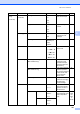
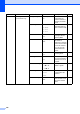
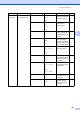

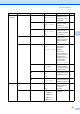


Table Of Contents
- USER’S GUIDE MFC-9120CN MFC-9320CW
- Approval Information and Compilation and Publication Notice
- Table of Contents
- Section I: General
- Section II: Fax
- Sending a fax
- How to fax
- Broadcasting (black & white only)
- Additional sending operations
- Sending faxes using multiple settings
- Electronic cover page (black & white only)
- Contrast
- Changing Fax Resolution
- Dual access (black & white only)
- Real Time Transmission
- Overseas Mode
- Delayed Fax (black & white only)
- Delayed batch transmission (black & white only)
- Checking and cancelling waiting jobs
- Sending a fax manually
- Out of memory message
- Receiving a fax
- Telephone and external devices
- Dialling and storing numbers
- Remote Fax Options (black & white only)
- Polling
- Printing reports
- Sending a fax
- Section III: Copy
- Section IV: Direct printing
- Section V: Software
- Section VI: Appendixes
- Index
- brother CHN_ENG

Menu and features
193
D
2.Fax
(continued)
2.Setup Send
(In Fax mode only)
1.Contrast Auto*
Light
Dark
Changes the
lightness or darkness
of faxes you send.
40
2.Fax Resolution Standard*
Fine
S.Fine
Photo
Sets the default
resolution for
outgoing faxes.
40
3.Delayed Fax — Sets the time of day in
24 hour format that
the delayed faxes will
be sent.
42
4.Batch TX On
Off*
Combines delayed
faxes going to the
same fax number at
the same time of day
into one transmission.
42
5.Real Time TX Next Fax:On
Next Fax:Off
On
Off*
Sends a fax without
using the memory.
41
6.Polled TX Standard*
Secure
Sets up your machine
with a document to be
retrieved by another
fax machine.
74
7.Coverpg Setup Next Fax:On
Next Fax:Off
On
Off*
Print Sample
Automatically sends a
cover page you have
programmed.
39
8.Coverpage Note — Sets up your own
comments for the fax
cover page.
39
9.Overseas Mode On
Off*
If you are having
difficulty sending
faxes overseas, set
this to On.
42
Main Menu Submenu Menu Selections Options Descriptions Page