
User Manual
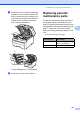


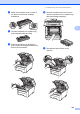
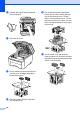
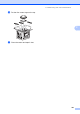


Table Of Contents
- USER’S GUIDE MFC-9120CN MFC-9320CW
- Approval Information and Compilation and Publication Notice
- Table of Contents
- Section I: General
- Section II: Fax
- Sending a fax
- How to fax
- Broadcasting (black & white only)
- Additional sending operations
- Sending faxes using multiple settings
- Electronic cover page (black & white only)
- Contrast
- Changing Fax Resolution
- Dual access (black & white only)
- Real Time Transmission
- Overseas Mode
- Delayed Fax (black & white only)
- Delayed batch transmission (black & white only)
- Checking and cancelling waiting jobs
- Sending a fax manually
- Out of memory message
- Receiving a fax
- Telephone and external devices
- Dialling and storing numbers
- Remote Fax Options (black & white only)
- Polling
- Printing reports
- Sending a fax
- Section III: Copy
- Section IV: Direct printing
- Section V: Software
- Section VI: Appendixes
- Index
- brother CHN_ENG

Troubleshooting and routine maintenance
185
C
e Attach the protective cover to each of
the drum unit and toner cartridge
assemblies.
f Put each assembly into a plastic bag
and completely seal each bag.
g Remove the belt unit by holding the
green handle and lifting the belt unit up
and out of the machine.
h Remove the waste toner box from the
machine, and then put it in a plastic bag
and seal the bag completely.
i Reinstall the belt unit back in the
machine.
h
h