
User Manual
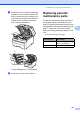


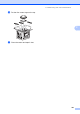


Table Of Contents
- USER’S GUIDE MFC-9120CN MFC-9320CW
- Approval Information and Compilation and Publication Notice
- Table of Contents
- Section I: General
- Section II: Fax
- Sending a fax
- How to fax
- Broadcasting (black & white only)
- Additional sending operations
- Sending faxes using multiple settings
- Electronic cover page (black & white only)
- Contrast
- Changing Fax Resolution
- Dual access (black & white only)
- Real Time Transmission
- Overseas Mode
- Delayed Fax (black & white only)
- Delayed batch transmission (black & white only)
- Checking and cancelling waiting jobs
- Sending a fax manually
- Out of memory message
- Receiving a fax
- Telephone and external devices
- Dialling and storing numbers
- Remote Fax Options (black & white only)
- Polling
- Printing reports
- Sending a fax
- Section III: Copy
- Section IV: Direct printing
- Section V: Software
- Section VI: Appendixes
- Index
- brother CHN_ENG

Troubleshooting and routine maintenance
181
C
i Slide each drum unit and toner cartridge
assembly into the machine. Make sure
that you match the toner cartridge color
to the same color label on the machine.
Repeat this for all the drum unit and
toner cartridge assemblies.
C-Cyan M-Magenta Y-Yellow K-Black
j Close the top cover of the machine.
Replacing periodic
maintenance parts C
The periodic maintenance parts will need to
be replaced regularly to maintain the print
quality. The parts listed below will have to be
replaced after printing approximately 50,000
pages
1
. Please call your Brother dealer
when the following messages appear on the
LCD.
1
A4 or Letter size single-sided pages.
K
Y
M
C
LCD message Description
Replace PF Kit Replace the paper feeding
kit for the paper tray.
Replace Fuser Replace the fuser unit.