
User Manual
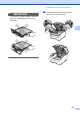


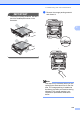

Table Of Contents
- USER’S GUIDE MFC-9120CN MFC-9320CW
- Approval Information and Compilation and Publication Notice
- Table of Contents
- Section I: General
- Section II: Fax
- Sending a fax
- How to fax
- Broadcasting (black & white only)
- Additional sending operations
- Sending faxes using multiple settings
- Electronic cover page (black & white only)
- Contrast
- Changing Fax Resolution
- Dual access (black & white only)
- Real Time Transmission
- Overseas Mode
- Delayed Fax (black & white only)
- Delayed batch transmission (black & white only)
- Checking and cancelling waiting jobs
- Sending a fax manually
- Out of memory message
- Receiving a fax
- Telephone and external devices
- Dialling and storing numbers
- Remote Fax Options (black & white only)
- Polling
- Printing reports
- Sending a fax
- Section III: Copy
- Section IV: Direct printing
- Section V: Software
- Section VI: Appendixes
- Index
- brother CHN_ENG

Troubleshooting and routine maintenance
173
C
a Turn off the machine. Unplug the
telephone line cord first, and then
unplug the power cord from the
electrical socket.
b Fully open the top cover by lifting up on
the handle (1).
IMPORTANT
When the scanner is open, you cannot
open the top cover.
c Take out all the drum unit and toner
cartridge assemblies.
IMPORTANT
• We recommend that you place the drum
unit and toner cartridge assembly on a
clean, flat surface with a sheet of
disposable paper or cloth underneath it in
case you accidentally spill or scatter toner.
• To prevent damage to the machine from
static electricity, DO NOT touch the
electrodes shown in the illustration.
• Handle the toner cartridge carefully. If
toner scatters on your hands or clothes,
wipe or wash it off with cold water at once.
1