
User Manual
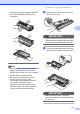
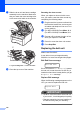
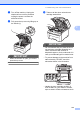
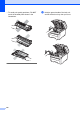
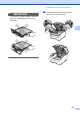


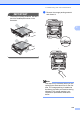

Table Of Contents
- USER’S GUIDE MFC-9120CN MFC-9320CW
- Approval Information and Compilation and Publication Notice
- Table of Contents
- Section I: General
- Section II: Fax
- Sending a fax
- How to fax
- Broadcasting (black & white only)
- Additional sending operations
- Sending faxes using multiple settings
- Electronic cover page (black & white only)
- Contrast
- Changing Fax Resolution
- Dual access (black & white only)
- Real Time Transmission
- Overseas Mode
- Delayed Fax (black & white only)
- Delayed batch transmission (black & white only)
- Checking and cancelling waiting jobs
- Sending a fax manually
- Out of memory message
- Receiving a fax
- Telephone and external devices
- Dialling and storing numbers
- Remote Fax Options (black & white only)
- Polling
- Printing reports
- Sending a fax
- Section III: Copy
- Section IV: Direct printing
- Section V: Software
- Section VI: Appendixes
- Index
- brother CHN_ENG

172
g Slide the drum unit and toner cartridge
assembly into the machine. Make sure
that you match the toner cartridge color
to the same color label on the machine.
C-Cyan M-Magenta Y-Yellow K-Black
h Close the top cover of the machine.
Resetting the drum counter
When you replace a drum unit with a new
one, you need to reset the drum counter by
completing the following steps:
a Plug the machine’s power cord back into
the electrical socket first, and reconnect
all cables and telephone line cord. Turn
on the machine.
b (For MFC-9320CW) Press Menu, 8, 4.
(For MFC-9120CN) Press Menu, 6, 4.
c Press a or b to choose the color of the
drum you replaced. Press OK.
d Press 1 to reset the drum unit counter.
e Press Stop/Exit.
Replacing the belt unit C
Model name BU-200CL
A new belt unit can print approximately
50,000 A4 or Letter size single-sided pages.
Belt End Soon message C
Belt End Soon
If the LCD shows Belt End Soon, it means
the belt unit is near the end of its life. Buy a
new belt unit and have it ready before you get
a Replace Belt message.
Replace Belt message C
When the following message appears on the
LCD, you need to replace the belt unit:
Replace Belt
IMPORTANT
•
DO NOT touch the surface of the belt unit.
If you touch it, it could degrade print quality.
• Damage caused by incorrect handling of
the belt unit may void your warranty.
K
Y
M
C