
User Manual

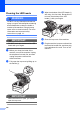
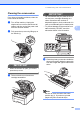
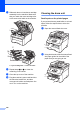
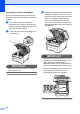


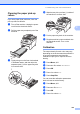
Table Of Contents
- USER’S GUIDE MFC-9120CN MFC-9320CW
- Approval Information and Compilation and Publication Notice
- Table of Contents
- Section I: General
- Section II: Fax
- Sending a fax
- How to fax
- Broadcasting (black & white only)
- Additional sending operations
- Sending faxes using multiple settings
- Electronic cover page (black & white only)
- Contrast
- Changing Fax Resolution
- Dual access (black & white only)
- Real Time Transmission
- Overseas Mode
- Delayed Fax (black & white only)
- Delayed batch transmission (black & white only)
- Checking and cancelling waiting jobs
- Sending a fax manually
- Out of memory message
- Receiving a fax
- Telephone and external devices
- Dialling and storing numbers
- Remote Fax Options (black & white only)
- Polling
- Printing reports
- Sending a fax
- Section III: Copy
- Section IV: Direct printing
- Section V: Software
- Section VI: Appendixes
- Index
- brother CHN_ENG

Troubleshooting and routine maintenance
157
C
d Push down the green-labelled lock
lever (1) and take the toner cartridge out
of the drum unit.
IMPORTANT
Handle the toner cartridge carefully. If
toner scatters on your hands or clothes,
wipe or wash it off with cold water at once.
e Put the print sample in front of the drum
unit, and find the exact position of the
poor print.
f Turn the drum unit gear by hand while
looking at the surface of the OPC
drum (1).
g When you have found the mark on the
drum that matches the print sample,
wipe the surface of the OPC drum with a
dry cotton swab until the dust or glue on
the surface comes off.
IMPORTANT
DO NOT clean the surface of the
photosensitive drum with a sharp object.
1
1