
User Manual


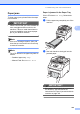
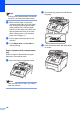


Table Of Contents
- USER’S GUIDE MFC-9120CN MFC-9320CW
- Approval Information and Compilation and Publication Notice
- Table of Contents
- Section I: General
- Section II: Fax
- Sending a fax
- How to fax
- Broadcasting (black & white only)
- Additional sending operations
- Sending faxes using multiple settings
- Electronic cover page (black & white only)
- Contrast
- Changing Fax Resolution
- Dual access (black & white only)
- Real Time Transmission
- Overseas Mode
- Delayed Fax (black & white only)
- Delayed batch transmission (black & white only)
- Checking and cancelling waiting jobs
- Sending a fax manually
- Out of memory message
- Receiving a fax
- Telephone and external devices
- Dialling and storing numbers
- Remote Fax Options (black & white only)
- Polling
- Printing reports
- Sending a fax
- Section III: Copy
- Section IV: Direct printing
- Section V: Software
- Section VI: Appendixes
- Index
- brother CHN_ENG

150
Routine maintenance C
Clean the outside and inside of the machine
regularly with a dry, lint-free cloth. When you
replace the toner cartridge or the drum unit,
make sure that you clean the inside of the
machine. If printed pages are stained with
toner, clean the inside of the machine with a
dry, lint-free cloth.
WARNING
Use neutral detergents. Cleaning with
volatile liquids such as thinner or benzine
will damage the surface of the machine.
DO NOT use any flammable substances,
spray or organic solvent/liquids containing
alcohol/ammonia to clean the inside or
outside of the machine. Doing this may
cause a fire or electrical shock. (For more
information see Important safety
instructions on page 111.)
Be careful not to inhale toner.
Cleaning the outside of the
machine C
a Turn off the machine. Unplug the
telephone line cord first, disconnect all
cables, and then unplug the power cord
from the electrical socket.
b Pull the paper tray completely out of the
machine.
c Wipe the outside of the machine with a
dry, lint-free soft cloth to remove dust.
d Remove any paper that is in the paper
tray.