
User Manual


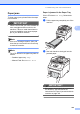
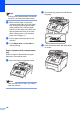


Table Of Contents
- USER’S GUIDE MFC-9120CN MFC-9320CW
- Approval Information and Compilation and Publication Notice
- Table of Contents
- Section I: General
- Section II: Fax
- Sending a fax
- How to fax
- Broadcasting (black & white only)
- Additional sending operations
- Sending faxes using multiple settings
- Electronic cover page (black & white only)
- Contrast
- Changing Fax Resolution
- Dual access (black & white only)
- Real Time Transmission
- Overseas Mode
- Delayed Fax (black & white only)
- Delayed batch transmission (black & white only)
- Checking and cancelling waiting jobs
- Sending a fax manually
- Out of memory message
- Receiving a fax
- Telephone and external devices
- Dialling and storing numbers
- Remote Fax Options (black & white only)
- Polling
- Printing reports
- Sending a fax
- Section III: Copy
- Section IV: Direct printing
- Section V: Software
- Section VI: Appendixes
- Index
- brother CHN_ENG

Troubleshooting and routine maintenance
149
C
• Handle the toner cartridge carefully. If
toner scatters on your hands or clothes,
wipe or wash it off with cold water at once.
• To avoid print quality problems, DO NOT
touch the shaded parts shown in the
illustrations.
d Pull out the jammed paper slowly.
e Slide each drum unit and toner cartridge
assembly into the machine. Make sure
that you match the toner cartridge color
to the same color label on the machine.
Repeat this for all the drum unit and
toner cartridge assemblies.
C-Cyan M-Magenta Y-Yellow K-Black
f Close the top cover.
g Plug the machine’s power cord back into
the electrical socket first, and reconnect
all cables and telephone line cord. Turn
on the machine.
K
Y
M
C