
User Manual
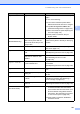


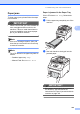
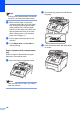


Table Of Contents
- USER’S GUIDE MFC-9120CN MFC-9320CW
- Approval Information and Compilation and Publication Notice
- Table of Contents
- Section I: General
- Section II: Fax
- Sending a fax
- How to fax
- Broadcasting (black & white only)
- Additional sending operations
- Sending faxes using multiple settings
- Electronic cover page (black & white only)
- Contrast
- Changing Fax Resolution
- Dual access (black & white only)
- Real Time Transmission
- Overseas Mode
- Delayed Fax (black & white only)
- Delayed batch transmission (black & white only)
- Checking and cancelling waiting jobs
- Sending a fax manually
- Out of memory message
- Receiving a fax
- Telephone and external devices
- Dialling and storing numbers
- Remote Fax Options (black & white only)
- Polling
- Printing reports
- Sending a fax
- Section III: Copy
- Section IV: Direct printing
- Section V: Software
- Section VI: Appendixes
- Index
- brother CHN_ENG

142
1
(X) shows the toner cartridge or drum unit color that is near the end of its life. (K)=Black, (Y)=Yellow, (M)=Magenta,
(C)=Cyan.
Short paper The paper size detected is
shorter than the paper size
defined in the print job and the
paper size being used requires
the back cover to be open.
Open the back cover (back output tray) and
remove any printed pages. Leave the back
cover open and press Mono Start or
Color Start.
Size mismatch The paper in the tray is not the
correct size.
Load the correct size of paper in the tray and
set the
“Paper Size” (Menu, 1, 2, 2 (See
Paper Size on page 24)).
Small paper The paper size defined in the
printer driver requires the back
cover to be open.
Open the back cover (back output tray) and
press Mono Start or Color Start. (See
Printing on thick paper, labels, envelopes or
small paper on page 13)
Toner Low The toner cartridge is near the
end of its life.
Buy a new toner cartridge for the color that is
indicated on the LCD before you get a
Replace Toner message.
Too Many Files
(MFC-9320CW only)
There are too many files stored
on the USB Flash memory drive.
Reduce the number of files stored on the
USB Flash memory drive.
Unusable Device
(MFC-9320CW only)
An incompatible or broken device
has been connected to the USB
direct interface.
Remove the USB Flash memory drive from
the USB direct interface.
WT Box End Soon The waste toner box is almost full. Buy a new waste toner box before you get a
Replace WT Box message.
Error Message Cause Action